Metaperson 2.0 FAQ
- 1 When should I use the finalize flag?
- 2 Can I apply finalize only to the generated hairstyle?
- 3 Can I skip removing the body under the outfit?
- 4 How can I combine apply_visibility_masks and finalize?
- 5 How can I select using zip in the link?
- 6 How can I embed sub-meshes or textures if my format supports them?
- 7 How can I change the texture LOD or usual LOD?
- 8 Do you know if I can download a few hairstyles or outfits?
- 9 What does each particular texture mean?
- 10 What does each particular avatar part mean?
- 11 How can I change neck size?
- 12 How can I recolor eyes?
The following are the frequently asked questions on Metaperson 2.0 export parameters and how to use them. If you have any questions not included in the list below, please do not hesitate to contact us at support@avatarsdk.com
1 When should I use the finalize flag?
The finalize flag should be used when you have completed all avatar customizations in the editor and want to create a final version of the avatar model that can be easily opened in third-party software. Read more about the finalize flag in the documentation.
Please find a sample export parameters below:
{
    "format": "fbx",
    "lod": "LOD1",
    "embed": true,

    "finalize": true,  /* make the final version of the model */

    "textures": {
        "profile": "1K.jpg",
        "embed": true,
        "list": [
            "Color",
            "Metallic",
            "Normal",
            "Roughness",
            "UnityMetallicSmoothness"
        ]
    },

    "blendshapes": {
        "values": {
            "body_shape": {
                "HeadScale": 1,
                "Scale": 1
            }
        },
        "embed": true,
        "list": [ "mobile_51", "visemes_15" ]
    },

    "avatar": {
        "colors": {
            "eyebrows": {"blue": 36,"green": 36,"red": 36 },
            "lips": {"blue": 104,"green": 111,"red": 188 },
            "skin": {"blue": 190,"green": 193,"red": 231 }
        },
        "list": [
            "AvatarBody",
            "AvatarHead",
            "AvatarEyelashes",
            "AvatarLeftCornea",
            "AvatarRightCornea",
            "AvatarLeftEyeball",
            "AvatarRightEyeball",
            "AvatarTeethLower",
            "AvatarTeethUpper"
        ]
    },

    "haircuts": {
        "list": [ "HaircutGenerated" ],
        "color": {"blue": 138,"green": 177,"red": 228 }
    },

    "outfits_top": {
        "color": {"blue": 227,"green": 243,"red": 249 },
        "list": [ "polo_Getik" ]
    },
    "outfits_bottom": {
        "list": [ "jeans_AZAT" ]
    },
    "outfits_shoes": {
        "list": [ "sneakers_AZAT" ]
    }
}
2 Can I apply finalize only to the generated hairstyle?
Currently, the finalize flag is applied export-wise. This means that it is applied for the generated haircut and for all assets you specified.
If you need to apply this flag only to the generated haircut, you could create two separate exports with the head and haircut in the first and the rest of the avatar in the second. Please note: in this case, you will have to align the head and the body by yourself as each model is placed at the origin of a space.
Please find a sample export parameters below:
[
     {
         "format": "glb",
         "embed": true,
         "finalize": true,

         "textures": {
             "list": [
                 "Color",
                 "Normal",
                 "GltfMetallicRoughness"
             ],
             "embed": true
         },

         "avatar": {
             "list": [
                 "AvatarEyelashes",
                 "AvatarHead",
                 "AvatarLeftEyeball",
                 "AvatarRightEyeball"
             ]
         },

         "haircuts": {
             "list": ["HaircutGenerated"]
         }
     },
     {
         "format": "glb",
         "embed": true,

         "textures": {
             "list": [
                 "Color",
                 "Normal",
                 "GltfMetallicRoughness"
             ],
             "embed": true
         },

         "avatar": {
             "list": ["AvatarBody"]
         },

         "outfits": {
             "list": ["KARI"]
         }
     }
 ]
3 Can I skip removing the body under the outfit?
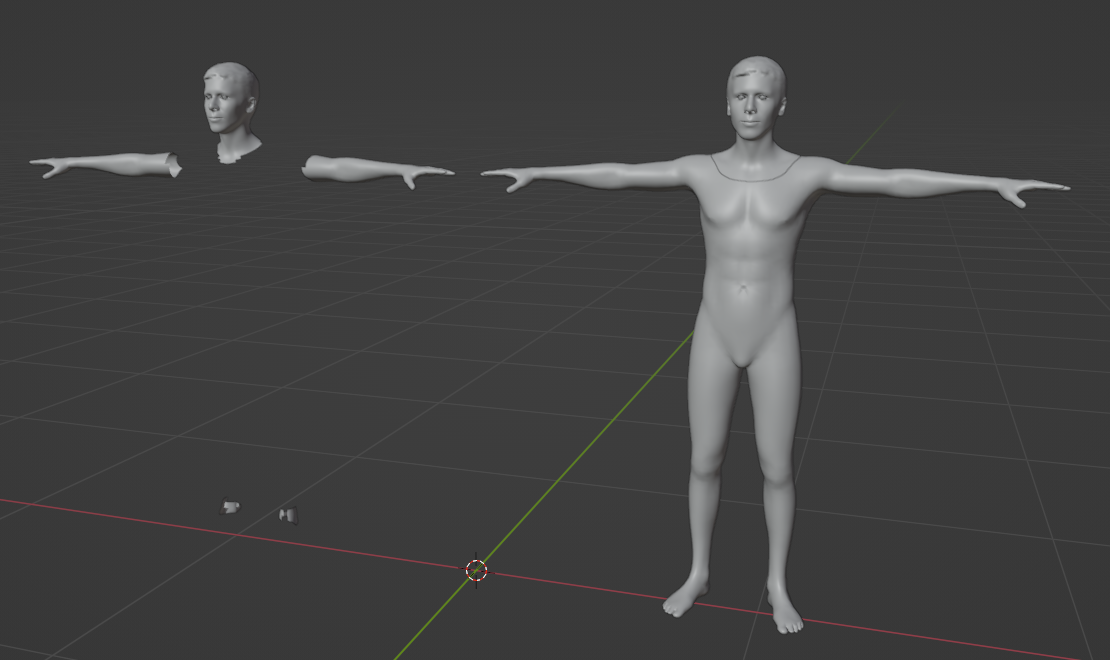
Yes. The body under the outfit is deleted only during mesh finalization (i.e., when finalize set to true). To avoid body deletion, you should set the apply_visibility_masks flag to false to turn off outfit visibility masks application. It can be set both export-wise and for the particular outfit category. Read more about the apply_visibility_masks flag in the documentation.
Please find a sample export parameters below:
{
    "format": "fbx",
    "lod": "LOD1",
    "embed": true,

    "finalize": true,
    "apply_visibility_masks": false,  /* skip removing the body under outfits */

    "textures": {
        "profile": "1K.jpg",
        "embed": true,
        "list": [
            "Color",
            "Metallic",
            "Normal",
            "Roughness",
            "UnityMetallicSmoothness"
        ]
    },

    "blendshapes": {
        "values": {
            "body_shape": {
                "HeadScale": 1,
                "Scale": 1
            }
        },
        "embed": true,
        "list": [ "mobile_51", "visemes_15" ]
    },

    "avatar": {
        "colors": {
            "eyebrows": {"blue": 36,"green": 36,"red": 36 },
            "lips": {"blue": 104,"green": 111,"red": 188 },
            "skin": {"blue": 190,"green": 193,"red": 231 }
        },
        "list": [
            "AvatarBody",
            "AvatarHead",
            "AvatarEyelashes",
            "AvatarLeftCornea",
            "AvatarRightCornea",
            "AvatarLeftEyeball",
            "AvatarRightEyeball",
            "AvatarTeethLower",
            "AvatarTeethUpper"
        ]
    },

    "haircuts": {
        "list": [ "HaircutGenerated" ],
        "color": {"blue": 138,"green": 177,"red": 228 }
    },

    "outfits_top": {
        "color": {"blue": 227,"green": 243,"red": 249 },
        "list": [ "polo_Getik" ]
    },
    "outfits_bottom": {
        "list": [ "jeans_AZAT" ]
    },
    "outfits_shoes": {
        "list": [ "sneakers_AZAT" ]
    }
}
Please find side-by-side comparation of meshes with visibility masks applied/disabled below:
Visibility masks applied/disabled
4 How can I combine apply_visibility_masks and finalize?
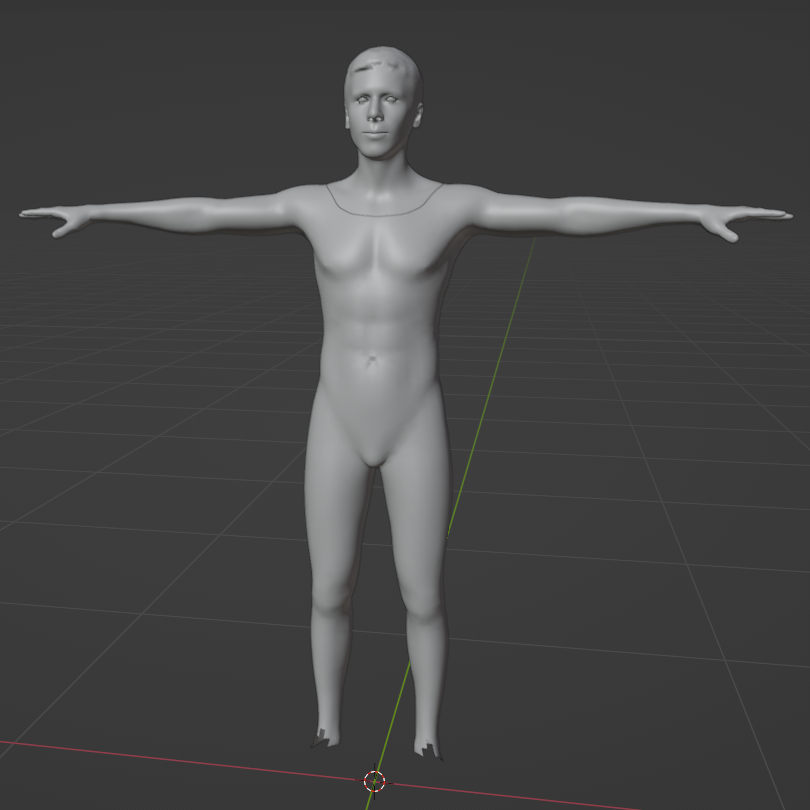
You can set the apply_visibility_masks flag both export-wise and for the particular outfit category. If finalize is set to false, apply_visibility_masks value is not applied. Read more about the apply_visibility_masks flag in the documentation.
Please find a sample export parameters below:
{
     "format": "fbx",
     "lod": "LOD1",
     "embed": true,

     "finalize": true,

     "textures": {
         "profile": "1K.jpg",
         "embed": true,
         "list": [
             "Color",
             "Metallic",
             "Normal",
             "Roughness",
             "UnityMetallicSmoothness"
         ]
     },

     "blendshapes": {
         "values": {
             "body_shape": {
                 "HeadScale": 1,
                 "Scale": 1
             }
         },
         "embed": true,
         "list": [ "mobile_51", "visemes_15" ]
     },

     "avatar": {
         "colors": {
             "eyebrows": {"blue": 36,"green": 36,"red": 36 },
             "lips": {"blue": 104,"green": 111,"red": 188 },
             "skin": {"blue": 190,"green": 193,"red": 231 }
         },
         "list": [
             "AvatarBody",
             "AvatarHead",
             "AvatarEyelashes",
             "AvatarLeftCornea",
             "AvatarRightCornea",
             "AvatarLeftEyeball",
             "AvatarRightEyeball",
             "AvatarTeethLower",
             "AvatarTeethUpper"
         ]
     },

     "haircuts": {
         "list": [ "HaircutGenerated" ],
         "color": {"blue": 138,"green": 177,"red": 228 }
     },

     "outfits_top": {
         "apply_visibility_masks": false,  /* skip removing the body under the top outfit */
         "color": {"blue": 227,"green": 243,"red": 249 },
         "list": [ "polo_Getik" ]
     },
     "outfits_bottom": {
         "apply_visibility_masks": false,  /* skip removing the body under the bottom outfit */
         "list": [ "jeans_AZAT" ]
     },
     "outfits_shoes": {
         "list": [ "sneakers_AZAT" ]
     }
 }
Please find the resulting mesh render below:
Visibility masks application is partially disabled
5 How can I select using zip in the link?
By default, all export files are packed into a zip archive (except for the static textures) available through the API. In some cases, it may be useful to make the archive available through the direct link or make the model available even without the archive (like importing into some online service). In this case, you could use make_public and make_public_direct flags. Please note: make_public_direct is applied only if make_public is set. Read more about make_public flags in the documentation.
Please find a sample export parameters below:
{
     "format": "fbx",
     "lod": "LOD1",
     "embed": true,

     "finalize": true,

     "make_public": true,         /* make model available through direct link */
     "make_public_direct": true,  /* make it available without zip archive */

     "textures": {
         "profile": "1K.jpg",
         "embed": true,
         "list": [
             "Color",
             "Metallic",
             "Normal",
             "Roughness",
             "UnityMetallicSmoothness"
         ]
     },

     "blendshapes": {
         "values": {
             "body_shape": {
                 "HeadScale": 1,
                 "Scale": 1
             }
         },
         "embed": true,
         "list": [ "mobile_51", "visemes_15" ]
     },

     "avatar": {
         "colors": {
             "eyebrows": {"blue": 36,"green": 36,"red": 36 },
             "lips": {"blue": 104,"green": 111,"red": 188 },
             "skin": {"blue": 190,"green": 193,"red": 231 }
         },
         "list": [
             "AvatarBody",
             "AvatarHead",
             "AvatarEyelashes",
             "AvatarLeftCornea",
             "AvatarRightCornea",
             "AvatarLeftEyeball",
             "AvatarRightEyeball",
             "AvatarTeethLower",
             "AvatarTeethUpper"
         ]
     },

     "haircuts": {
         "list": [ "HaircutGenerated" ],
         "color": {"blue": 138,"green": 177,"red": 228 }
     },

     "outfits_top": {
         "color": {"blue": 227,"green": 243,"red": 249 },
         "list": [ "polo_Getik" ]
     },
     "outfits_bottom": {
         "list": [ "jeans_AZAT" ]
     },
     "outfits_shoes": {
         "list": [ "sneakers_AZAT" ]
     }
 }
6 How can I embed sub-meshes or textures if my format supports them?
To embed sub-meshes and textures into one model file you should use one of the fbx, glb or gltf export formats.
Then, you could set the top-level embed flag to true to embed all sub-meshes into the one model. Top-level value is propagated to the avatar parts (e.g., haircuts, outfits, etc.). To exclude particular avatar parts from this behavior, explicitly set the category-level embed flag to false.
For texture embedding, there is a separate embed flag in the textures section, both top-level and category-level. The value propagation behavior is the same as for the sub-meshes.
Please note: the old embed_textures flag is not applicable for the metaperson_2.0 pipeline.
Read more about embed flags in the documentation.
Please find a sample export parameters below:
{
     "format": "fbx",
     "lod": "LOD1",
     "embed": true,  /* embed sub-meshes */

     "textures": {
         "profile": "1K.jpg",
         "embed": true,  /* embed textures */
         "list": [
             "Color",
             "Metallic",
             "Normal",
             "Roughness",
             "UnityMetallicSmoothness"
         ]
     },

     "blendshapes": {
         "embed": true,
         "list": [ "mobile_51", "visemes_15" ]
     },

     "avatar": {
         "list": [
             "AvatarBody",
             "AvatarHead",
             "AvatarEyelashes",
             "AvatarLeftCornea",
             "AvatarRightCornea",
             "AvatarLeftEyeball",
             "AvatarRightEyeball",
             "AvatarTeethLower",
             "AvatarTeethUpper"
         ]
     },

     "haircuts": {
         "list": [ "HaircutGenerated" ],
     },

     "outfits_top": {
         "embed": false,  /* DO NOT embed top outfits meshes */
         "list": [ "polo_Getik" ]
     },
     "outfits_bottom": {
         "list": [ "jeans_AZAT" ]
     },
     "outfits_shoes": {
         "list": [ "sneakers_AZAT" ]
     }
 }
7 How can I change the texture LOD or usual LOD?
To change the mesh LOD, you should set the lod parameter in the avatar part section or at the top level as an upper-case string (e.g., "LOD1"). Read more about lod parameter in the documentation.
To change texture LOD, you should set profile parameter the avatar part textures section or top-level in the form of string with the desired resolution and format (i.e. "4K.jpg"). Each avatar part has its own texture set produced from the SOURCE.png original texture. Textures are not upscaled. Thus, there will be no 4K file for the 1K source, and the 4K requested profile may contain links to 2K textures. Read more about the profile parameter in the documentation.
Please find a sample export parameters below:
{
     "format": "fbx",
     "lod": "LOD1",  /* use mesh LOD1 */
     "embed": true,

     "textures": {
         "profile": "1K.jpg",  /* use 1K textures in JPG format */
         "embed": true,
         "list": [
             "Color",
             "Metallic",
             "Normal",
             "Roughness",
             "UnityMetallicSmoothness"
         ]
     },

     "blendshapes": {
         "embed": true,
         "list": [ "mobile_51", "visemes_15" ]
     },

     "avatar": {
         "list": [
             "AvatarBody",
             "AvatarHead",
             "AvatarEyelashes",
             "AvatarLeftCornea",
             "AvatarRightCornea",
             "AvatarLeftEyeball",
             "AvatarRightEyeball",
             "AvatarTeethLower",
             "AvatarTeethUpper"
         ]
     },

     "haircuts": {
         "list": [ "HaircutGenerated" ],
     },

     "outfits_top": {
         "embed": false,
         "list": [ "polo_Getik" ]
     },
     "outfits_bottom": {
         "list": [ "jeans_AZAT" ]
     },
     "outfits_shoes": {
         "list": [ "sneakers_AZAT" ]
     }
 }
8 Do you know if I can download a few hairstyles or outfits?
You can specify in export parameters and download several hairstyles/outfits per avatar export. Please find a sample export parameters below:
{
     "format": "fbx",
     "lod": "LOD1",
     "embed": true,

     "textures": {
         "profile": "1K.jpg",
         "embed": true,
         "list": [
             "Color",
             "Metallic",
             "Normal",
             "Roughness",
             "UnityMetallicSmoothness"
         ]
     },

     "blendshapes": {
         "embed": true,
         "list": [ "mobile_51", "visemes_15" ]
     },

     "avatar": {
         "list": [
             "AvatarBody",
             "AvatarHead",
             "AvatarEyelashes",
             "AvatarLeftCornea",
             "AvatarRightCornea",
             "AvatarLeftEyeball",
             "AvatarRightEyeball",
             "AvatarTeethLower",
             "AvatarTeethUpper"
         ]
     },

     "haircuts": {
         "embed": false,
         "list": [ "Haircut0", "Haircut1" ]  /* export 2 haircuts, not embedded */
     },

     "outfits_top": {
         "embed": false,
         "list": [ "polo_Getik", "shirt_Olympus" ]  /* export 2 top outfits, not embedded */
     },
     "outfits_bottom": {
         "embed": false,
         "list": [ "jeans_AZAT", "pants_SEVAN" ]  /* export 2 bottom outfits, not embedded */
     },
     "outfits_shoes": {
         "embed": false,
         "list": [ "sneakers_AZAT", "sneakers_SEVAN" ]  /* export 2 shoes, not embedded */
     }
 }
9 What does each particular texture mean?
The avatar model contains a set of textures to enable physically based rendering and several additional masks. Please find the list of available textures below:
- Color - a regular RGB base color/albedo map or RGBA for some assets.
- Normal - normal map, RGB
- Roughness - roughness/smoothness map, grayscale
- Metallic - metalness map, grayscale
- GltfMetallicRoughness - metalness and roughness map for GLTF model format, RGB with metalness in blue channel and roughness in green
- UnityMetallicSmoothness- metalness and smoothness map for use with Unity engine, RGBA with metalness in the red channel and smoothnness in the alpha (smoothness is inverted roughness, i.e., smoothness = 255-roughness)
- BodyVisibilityMask - map of body visibility under the outfit, grayscale, unique per outfit
- HeadVisibilityMask - map of head (neck, torso) visibility under the outfit, grayscale, unique per outfit
- RecoloringMask - map of outfit parts, on which color map may be altered, grayscale
10 What does each particular avatar part mean?
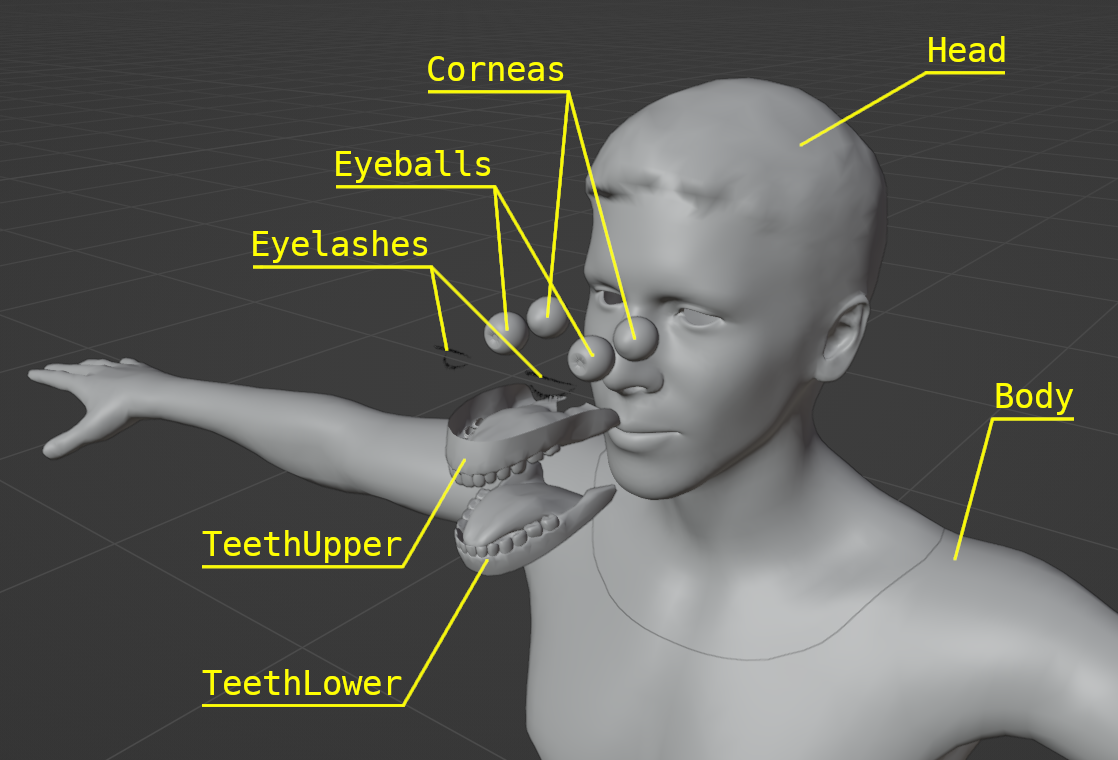
The avatar model consists of the following sub-meshes:
- AvatarHead - avatar head with neck and upper part of the torso
- AvatarBody - the rest of the avatar body
- AvatarLeftCornea/AvatarRightCornea - cornea, textured from the submitted photo
- AvatarLeftEyeball/AvatarRightEyeball - eyeball model with artificial texture, placed inside cornea
- AvatarEyelashes - eyelashes model
- AvatarTeethLower - upper teeth with palate
- AvatarTeethUpper - lower teeth with tongue
Please find sub-meshes correspondence on the screenshot below:
Avatar sub-meshes correspondence
11 How can I change neck size?
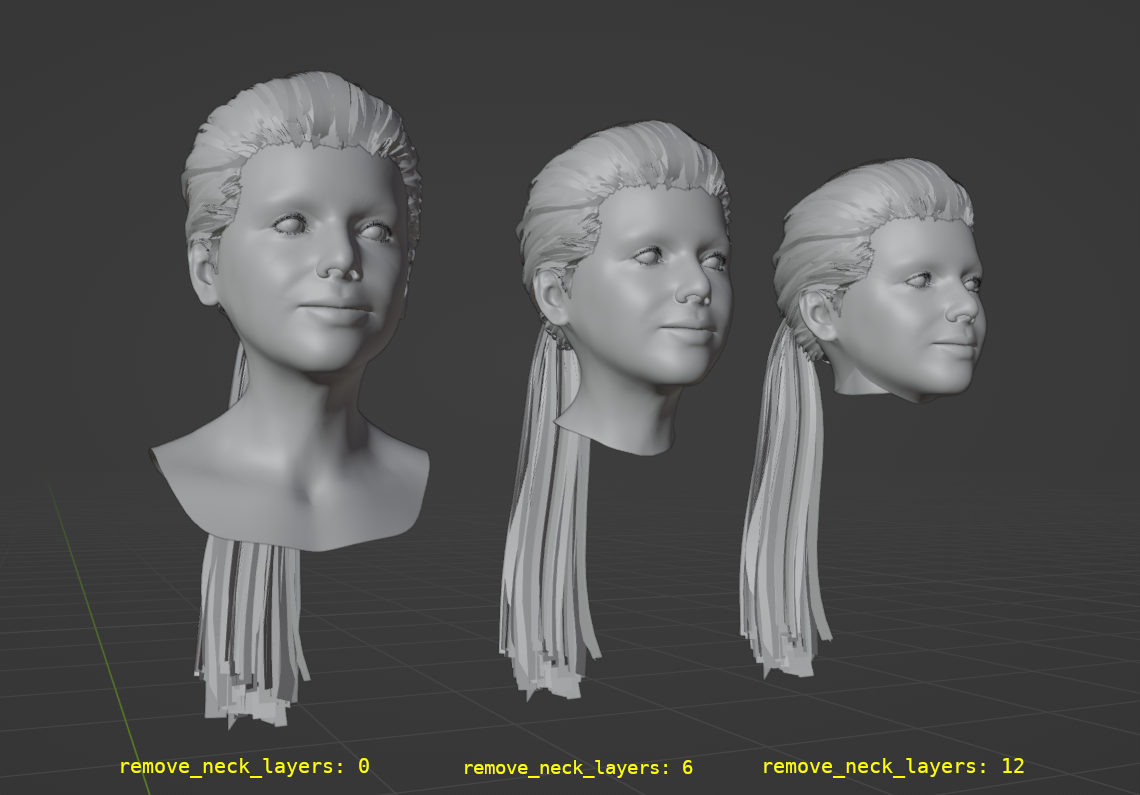
Neck size may be changed with remove_neck_layers export parameter. Read more about remove_neck_layers parameter in the documentation.
See sample renders for different values of remove_neck_layers below:
remove_neck_layers comparison
Please find a sample export parameters below:
{
    "format": "glb",
    "lod": "LOD1",
    "embed": true,

    "remove_neck_layers": 8,

    "textures": {
        "list": ["Color"],
        "embed": true,
        "profile": "1K.jpg"
    },

    "avatar": {
        "list": [
            "AvatarEyelashes",
            "AvatarHead",
            "AvatarLeftCornea",
            "AvatarLeftEyeball",
            "AvatarRightCornea",
            "AvatarRightEyeball",
            "AvatarTeethLower",
            "AvatarTeethUpper"
        ]
    },

    "haircuts": {
        "list": ["Haircut0"]
    }
}
12 How can I recolor eyes?
There are two types of eyes available for the avatar:
- cornea, textured from the submitted photo
- artificial eyeball model, colored close to the submitted photo, may be recolored
By default, cornea is used. To recolor avatar eyes, cornea should be made transparent (see transparent_cornea documentation) and iris and sclera colors should be set (see colors documentation).
Please find a sample export parameters below:
{
  "format": "glb",
  "lod": "LOD1",
  "finalize": true,
  "transparent_cornea": true,

  "textures": {
    "embed": true,
    "profile": "1K.jpg"
  },

  "avatar": {
    "list": [
      "AvatarBody",
      "AvatarHead",
      "AvatarEyelashes",
      "AvatarLeftCornea",
      "AvatarLeftEyeball",
      "AvatarRightCornea",
      "AvatarRightEyeball",
      "AvatarTeethLower",
      "AvatarTeethUpper"
    ],
    "colors": {
      "iris": { "red": 73, "green": 97, "blue": 55 },
      "sclera": { "red": 238, "green": 208, "blue": 210 }
    },
    "textures": {
      "list": [
        "Color",
        "Normal",
        "UnityMetallicSmoothness",
        "Roughness"
      ]
    }
  },

  "haircuts": {
    "list": ["HaircutGenerated"],
    "embed": true,
    "textures": {
      "embed": true,
      "list": [
        "Color",
        "Normal",
        "AO",
        "UnityMetallicSmoothness",
        "Roughness",
        "Metallic"
      ]
    }
  },

  "outfits": {
    "list": ["ARPI"],
    "embed": true,
    "textures": {
      "embed": true,
      "list": [
        "Color",
        "Normal",
        "UnityMetallicSmoothness",
        "Roughness",
        "Metallic"
      ]
    }
  }
}
Please note: in case of fbx avatar export format, some model viewers may not display transparent cornea correctly, thus it is better to remove AvatarRightCornea and AvatarLeftCornea avatar parts from the export parameters.