Avatar SDK Cloud API: body_0.3 pipeline (FitPerson, legacy)
- 1 Usage examples
- 2 API basics
- 3 Avatars
- 4 Methods
1 Usage examples
If you want to try out Avatar WEB API in action right now, please see the samples below.
Before you begin, please check our recommendations for improving the resulting model (in the order of significance):
- The face should be easily recognizable in the photo. The photo is not blurry.
- The person should have hair removed from the forehead and the sides of the face, otherwise, hair may appear on the face texture.
- Uniform good lighting on the photo, without dark shadows or too bright glare.
- A person should keep a neutral facial expression or slight smile but without opening their mouth. If teeth are visible on the input photo the lip texture might be incorrect (if the remove_smile flag is turned off).
- It's best to look straight into the camera without turning your neck or eyes. This way Head pipeline can generate good-looking shoulders.
- We advise removing the glasses because they're reconstructed only in the texture, not 3D mesh (if the remove_glasses flag is turned off). But this is not completely necessary.
- Curl samples
- MetaPerson sample - authorize, create Player ID, create an avatar, poll its status, and download its mesh and texture using the curl utility and Exports API
- FitPerson sample - authorize, create Player ID, create an avatar, poll its status, and download its mesh and texture using the curl utility and Exports API
- selfie code sample (head_2.0) - create a selfie upload page and avatar once the selfie is uploaded using the curl utility
- Other samples
- js sample - authorize, create an avatar, poll its status and download its files with Avatar Exports API in JavaScript. Also, visualize the computed avatar with three.js
- Python script (head_2.0) - authorize, create Player ID, create an avatar, poll its status, and download its mesh and texture with Python script
More API usage examples are coming.
2 API basics
Root API URL: https://api.avatarsdk.com/
API endpoints produce JSON responses unless stated otherwise. Please see the Content-Type HTTP Header for a particular response format.
All POST requests accept multipart/form-data unless stated otherwise.
All mesh/pointcloud retrieval endpoints produce a zip archive with mesh/pointcloud in binary PLY format unless stated otherwise.
2.1 Authentication with OAuth 2.0
Before any of the API methods can be used, you should generate an application identifier (referenced later as client_id) for your app. This identifier is used to obtain the access token which is then used to sign actual API requests. You could use one of the official libraries listed on the OAuth site (recommended) or any other on your taste to add OAuth 2.0 support to your app.
To get your client_id and client_secret, please sign up for the AvatarSDK developer account.
Besides client_id and client_secret (depending on the application authorization grant type) you will need the following settings:
- application authorization URL: https://api.avatarsdk.com/o/authorize/
- token retrieving URL: https://api.avatarsdk.com/o/token/
- default application redirect URL: https://api.avatarsdk.com/o/default_callback/
For more information on grant types, see section 4 of the OAuth 2.0 RFC document.
2.2 Pagination
All requests that return lists are paginated: each particular request returns a list of requested objects (up to 100 objects per page) and links to the first, previous, next, and last pages in the Link HTTP header. If there are no other pages - the Link header will not be present.
The Link header may contain up to 4 entries separated by a comma ,. Each entry contains the URL itself and its relation name (rel) separated by a semicolon ;. See example below:
$ curl -v -X GET -H "Authorization: Bearer F88pQWs8hoPzbeCg4xTGifDxxs1eKu" -H "Accept: application/json" "https://api.avatarsdk.com/avatars/?page=3"
> GET /avatars/?page=3 HTTP/1.1
> User-Agent: curl/7.35.0
> Host: api.avatarsdk.com
> Authorization: Bearer F88pQWs8hoPzbeCg4xTGifDxxs1eKu
> Accept: application/json
>
< HTTP/1.0 200 OK
< Date: Mon, 03 Apr 2017 04:08:15 GMT
< Link: <https://api.avatarsdk.com/avatars/>; rel="first", <https://api.avatarsdk.com/avatars/?page=2>; rel="prev", <https://api.avatarsdk.com/avatars/?page=4>; rel="next", <https://api.avatarsdk.com/avatars/?page=5>; rel="last"
< Content-Type: application/json
< Allow: GET, POST, HEAD, OPTIONS
<
[...]
For more information about the Link header, see the Web Linking RFC document.
2.3 Filtering
Results of list-retrieving requests may be filtered by some fields of requested objects (e.g. creation time, status, etc.) by specifying filters as a query parameter. All filters are case-insensitive unless stated otherwise. Filters may be specified several times. In this case, they all will be joined via logical AND. See example below:
$ curl -v -H "Authorization: Bearer F88pQWs8hoPzbeCg4xTGifDxxs1eKu" -X GET "https://api.avatarsdk.com/avatars/?status=completed&description=fb"
> GET /avatars/?status=completed&description=fb HTTP/1.1
> User-Agent: curl/7.35.0
> Host: api.avatarsdk.com
> Accept: */*
> Authorization: Bearer F88pQWs8hoPzbeCg4xTGifDxxs1eKu
>
< HTTP/1.0 200 OK
< Date: Mon, 03 Apr 2017 04:08:15 GMT
< Link: <https://api.avatarsdk.com/avatars/?description=fb&status=completed>; rel="first", <https://api.avatarsdk.com/avatars/?description=fb&page=1&status=completed>; rel="last"
< Vary: Accept, Cookie
< Content-Type: application/json
< Allow: GET, POST, HEAD, OPTIONS
<
[...]
Please see the filters section in particular request documentation to find available filters.
2.4 Developer/Client access
API has two different access modes: developer and client access. The Client access mode is slightly more restricted in terms of access to some methods: e.g. it is restricted to list all avatars created with the same client_id and allowed to list only those created with the same PlayerUID, etc.
Please see the detailed description for each particular method to find more information about available access modes and their restrictions.
It is highly recommended to use Client access in applications released into production: malicious users won't be able to access or delete data of other users even if client_id and client_secret are compromised.
Client access mode requires signing each request with a PlayerUID identifier along with the OAuth access token. To do this you need to register PlayerUID once per unique application (e.g. on the first launch) and then sign each request with this PlayerUID via X-PlayerUID HTTP header. See example below:
$ curl -v -H "Authorization: Bearer F88pQWs8hoPzbeCg4xTGifDxxs1eKu" -H "X-PlayerUID: 9418fd52-baef-401c-a2b3-e6fe16d93596" -X GET "https://api.avatarsdk.com/avatars/"
> GET /avatars/ HTTP/1.1
> User-Agent: curl/7.35.0
> Host: api.avatarsdk.com
> Accept: */*
> Authorization: Bearer F88pQWs8hoPzbeCg4xTGifDxxs1eKu
> X-PlayerUID: 9418fd52-baef-401c-a2b3-e6fe16d93596
>
< HTTP/1.0 200 OK
< Date: Mon, 03 Apr 2017 04:08:15 GMT
< Vary: Accept, Cookie
< Link: <https://api.avatarsdk.com/avatars/>; rel="first", <https://api.avatarsdk.com/avatars/?page=1>; rel="last"
< Content-Type: application/json
< Allow: GET, POST, HEAD, OPTIONS
<
[...]
2.5 Throttling
To keep our system stable and healthy, we introduced a throttling mechanism that limits how many HTTP requests any particular client is allowed to make. Current limits are set to the following values:
- 75 requests per minute per unique PlayerUID in Client access mode
- 150 requests per minute for an entire account in Developer access mode
Please note: in the Client access mode there is no limit to the number of requests per SDK account. To avoid throttling, please make sure to follow these guidelines:
- Make sure you are not using Developer access mode in production
- Make sure that every user of your app has a unique PlayerUID associated with it, and that all requests are signed with this PlayerUID. Even if your app or game does not have user accounts, you should still register a unique ID for every client or device. Otherwise, you'll face throttling issues
If an application exceeds limits it will receive HTTP 429 TOO MANY REQUESTS response code and Retry-After HTTP Response Header will be set to the number of seconds the application will need to wait to perform the next request. See example below:
$ curl -v -H "Authorization: Bearer F88pQWs8hoPzbeCg4xTGifDxxs1eKu" -X GET "https://api.avatarsdk.com/avatars/"
> GET /avatars/ HTTP/1.1
> User-Agent: curl/7.35.0
> Host: api.avatarsdk.com
> Accept: */*
> Authorization: Bearer F88pQWs8hoPzbeCg4xTGifDxxs1eKu
>
< HTTP/1.0 429 TOO MANY REQUESTS
< Date: Mon, 03 Apr 2017 04:08:15 GMT
< Retry-After: 10
< Vary: Accept, Cookie
< Content-Type: application/json
< Allow: GET, POST, HEAD, OPTIONS
<
{"detail":"Request was throttled. Expected available in 10.0 seconds."}
3 Avatars
3.1 Available pipelines
Please note: this document describes only body_0.3 pipeline. There are more pipelines available. Please visit main document
Source photo

3.1.1 body_0.3
deprecated
Predicted bald head and full body model with fixed topology, predicted and artificial haircuts, and artificial outfits. Predictions of the body shape may be improved by specifying the height, weight, gender, and body measurements of the model. The model skeleton is also available for use with animations. Support various export options via the export parameters (multiple formats, unified or separate meshes, textures, etc).
Available starting Pro plan subscription.
Please note: this pipeline utilizes export parameters
Available subtypes:
- mobile (FitPerson) - full body model based on the SMPL model that is created by the Max-Planck Institute with a set of 51 facial blendshapes and 15 visemes. Have an additional head export template, which is effectively head/mobile subtype of head_2.0 pipeline.
- female, male (MetaPerson) - a set of bodies created by 3D artists with a head automatically generated from selfies. The animation rig for the bodies is compatible with Adobe's Mixamo, which makes them compatible with a large existing set of animations. Fixed body shape allows 3D artists to apply custom-designed outfits easier than before. The head is based on the head_2.0 pipeline.
Model samples
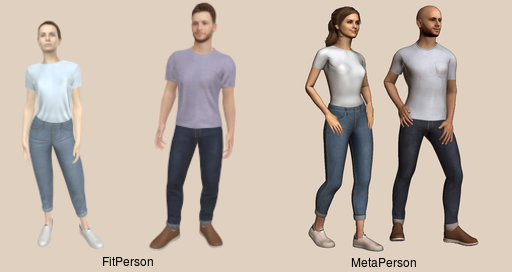
Available LODs:
FitPerson
default template head template LOD# vertices faces vertices faces 0 18689 34578 12367 23404 1 15633 28102 10374 19054 2 13850 24880 9116 16860 3 9285 16173 6059 11007 4 8096 13905 5287 9497 5 6987 11565 4587 7889 6 6271 10151 4106 6937 7 4267 7140 2102 3926 MetaPerson
female/male subtype LOD# vertices faces 0 19538 36196 1 15633 28102 2 13854 24880 3 9291 16173 4 8102 13905 5 6993 11565 6 6277 10151 7 4273 7140
3.2 Computation parameters
Avatar computation parameters contain a set of flags and parameters to fine-tune the avatar computation process. These parameters have two levels of detail:
- The first level is the parameter categories. E.g. set of blendshapes, haircuts, avatar modifications, etc. Please find all available categories with their description in the sections below.
- The second level is parameter types: enumerable and key-value parameters. Avatar computation parameters affect the computation process only if they are specified explicitly. Enumerable parameters are simply listed as JSON arrays, and key-value parameters are specified as JSON objects. The value type is parameter-dependent. Please see the parameter description in the sections below. Please note: all parameters are considered enumerable by default unless stated otherwise.
Please see the parameters retrieval request to retrieve a list of available and default parameters for each particular pipeline and pipeline subtype on your account.
3.2.1 Model info
Avatar SDK is capable of providing some meta-information about computed avatars from source photos like a haircut, skin, eye color, etc. Please find the list of available meta-information parameters below:
- age
- Classify a person's age from a submitted photo. Currently, possible values are child and not_child. age_confidence also will be present in model_info to represent the confidence of age classification with a value in the range [0.5, 1] inclusive
- body_shape_coeffs_10
As FitPerson avatars are based on the SMPL model that is created by the Max-Planck Institute, SMPL model coefficients applied to the resulting avatar may be included in model info.
Please note: to use these coefficients you will need an active SMPL license. Please find more information on the Meshcapade site.
- eye_iris_color
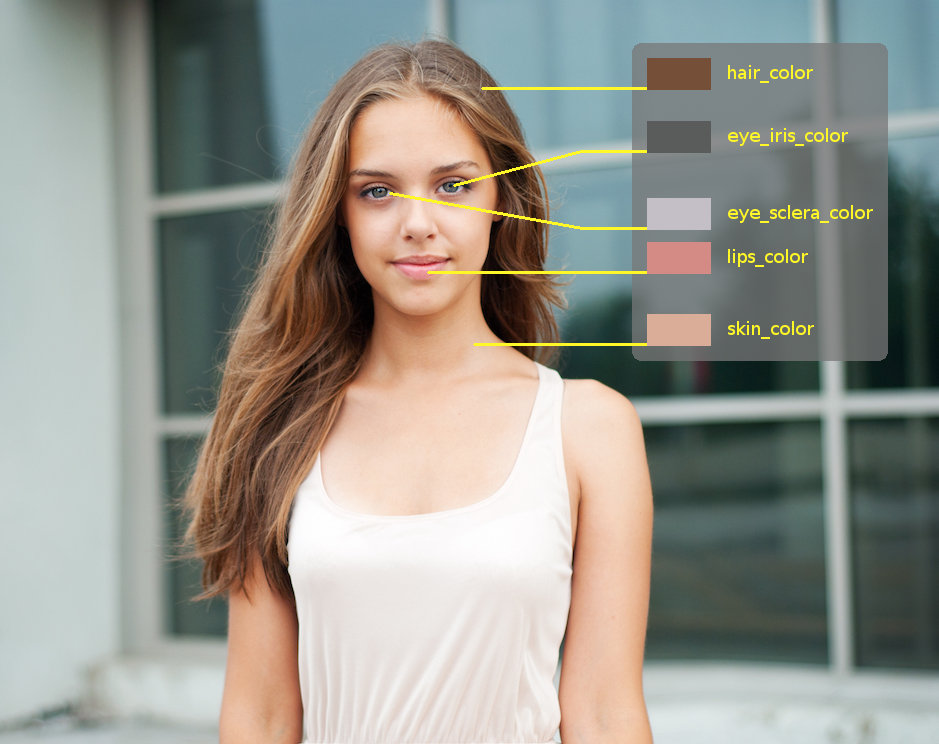
- Compute average eye iris color [1] from a submitted photo
- eye_sclera_color
- Compute average eye sclera color [1] from a submitted photo
- facial_landmarks_68
Compute facial landmarks. Landmark coordinates are represented as a flat JSON array with X, Y, and Z float components sequence for each landmark, or NaN (for each component) if no landmark is detected
Landmarks correspondence
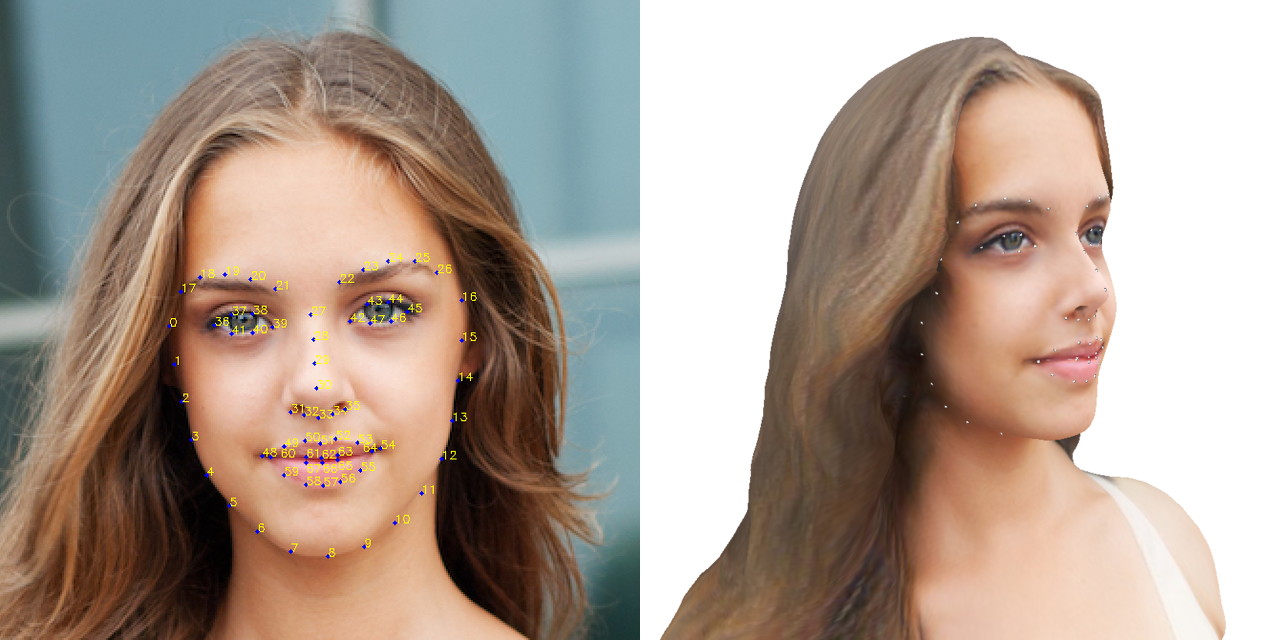 (click on image to magnify)
- gender
- Predict a person's gender from a submitted photo. Possible values are male and female. gender_confidence also will be present in model_info to represent the confidence of gender prediction with a value in the range [0.5, 1] inclusive
- hair_color
- Compute the average haircut color [1] from a submitted photo
- race
Predict the person race from the submitted photo. Currently, three races are predicted (asian, black, and white) with certain confidence for each race in the range [0, 1] inclusive. The resulting information will include the most probable race with its confidence and a JSON Object with all races with their confidences. Please see the sample model info below:
{
   "pipeline" : "body_0.3",
   "pipeline_subtype" : "female",
   "race" : "white",
   "race_confidence" : 0.9999996423721313,
   "races" : {
      "asian" : 2.615514413124159e-13,
      "black" : 4.136433915391535e-07,
      "white" : 0.9999996423721313
   }
}
- skin_color
- Compute average skin color [1] from a submitted photo
Colors correspondence
3.2.1.1 Parameters availability
| Parameter Name | Pipeline / Pipeline Subtype | |
|---|---|---|
| body_0.3 | ||
| female, male | mobile | |
| age | ✓ | ✓ |
| body_shape_coeffs_10 | ✓ | |
| eye_iris_color | ✓ | ✓ |
| eye_sclera_color | ✓ | ✓ |
| facial_landmarks_68 | ✓ | ✓ |
| gender | ✓ | ✓ |
| hair_color | ✓ | ✓ |
| race | ✓ | ✓ |
| skin_color | ✓ | ✓ |
Please see the parameters retrieval request to retrieve a list of available model info flags for a particular pipeline type and pipeline subtype for your account.
3.2.1.2 Usage examples
- curl
$ curl -H "Authorization: Bearer F88pQWs8hoPzbeCg4xTGifDxxs1eKu" \
       -H "X-PlayerUID: 9418fd52-baef-401c-a2b3-e6fe16d93596" \
       -X POST \
       "https://api.avatarsdk.com/avatars/" \
       -F "pipeline=body_0.3" \
       -F "pipeline_subtype=female" \
       -F "name=info test" \
       -F "parameters={\"model_info\": [\"hair_color\"]}" \
       -F "photo=@photo.jpg"

{
    "code": "d4a31ac7-4aab-4cdc-b70b-75e75fc6bd91",
    "created_on": "2019-10-01T08:16:03.831260Z",
    "description": "",
    "name": "test",
    "progress": 0,
    "status": "Uploading",
    "url": "https://api.avatarsdk.com/avatars/d4a31ac7-4aab-4cdc-b70b-75e75fc6bd91/"
}

$ curl -H "Authorization: Bearer F88pQWs8hoPzbeCg4xTGifDxxs1eKu" \
       -H "X-PlayerUID: 9418fd52-baef-401c-a2b3-e6fe16d93596" \
       -X GET \
       "https://api.avatarsdk.com/avatars/d4a31ac7-4aab-4cdc-b70b-75e75fc6bd91/model_info/"

{
    "hair_color": {
        "blue": 56,
        "green": 79,
        "red": 117
    },
    "pipeline": "body_0.3",
    "pipeline_subtype": "female"
}
3.2.2 Avatar modifications
Avatar SDK is aimed at producing recognizable photo-realistic avatars. However, there is demand for avatar modifications, leaving avatars recognizable, though. Please find available avatar modifications below.
Please note: all parameters for this category are key-value, and modify the original avatar respectively its description.
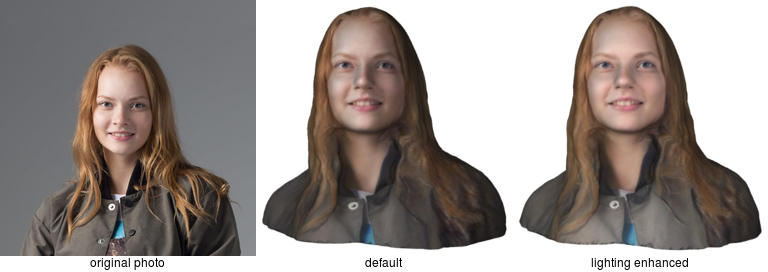
- enhance_lighting : boolean
Attempt to make lighting more uniform. See the models comparison below
Models comparison
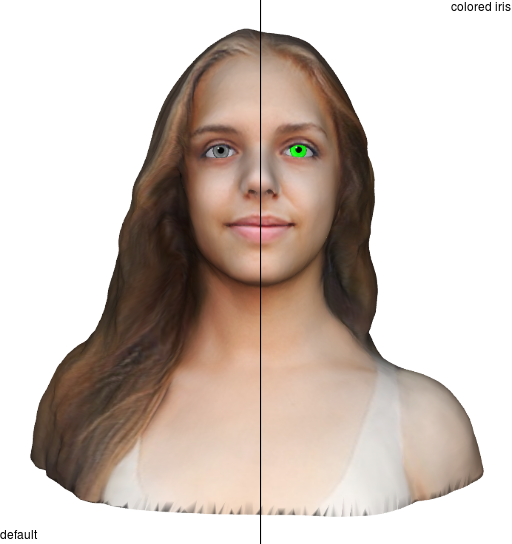
- eye_iris_color : color [1]
Recolor the eye iris directly on a model texture. Works only when parametric_eyes_texture is set. See textures comparison below for {"red": 0, "green": 255, "blue": 0} color
Models comparison
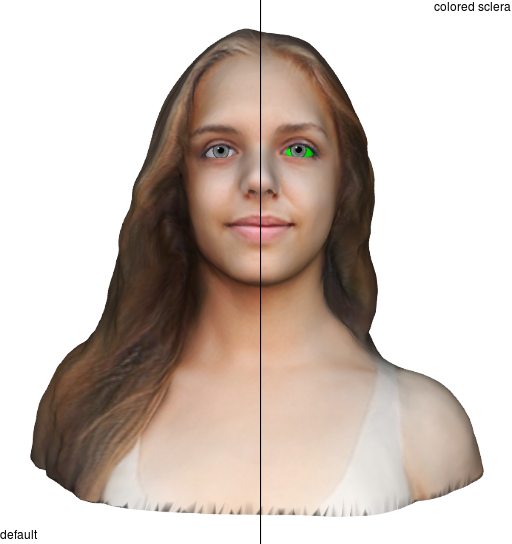
- eye_sclera_color : color [1]
Recolor eye sclera directly on a model texture. Works only when parametric_eyes_texture is set. See textures comparison below for {"red": 0, "green": 255, "blue": 0} color
Models comparison
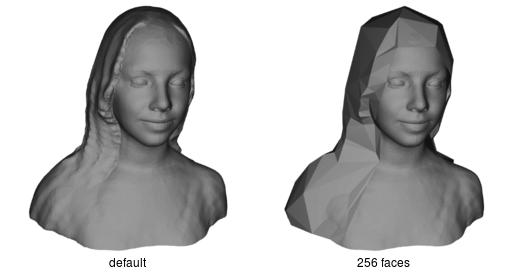
- generated_haircut_faces_count : integer
Resample generated haircut mesh to have specified face count. See the models comparison below for default and 256 faces count haircut (rendered without texture)
Models comparison
- generated_haircut_texture_size : size [2]
- Resize the generated haircut texture to the specified size. The original haircut texture size is 1024x1024 px, thus setting a size greater than this value will not result in improved texture quality.
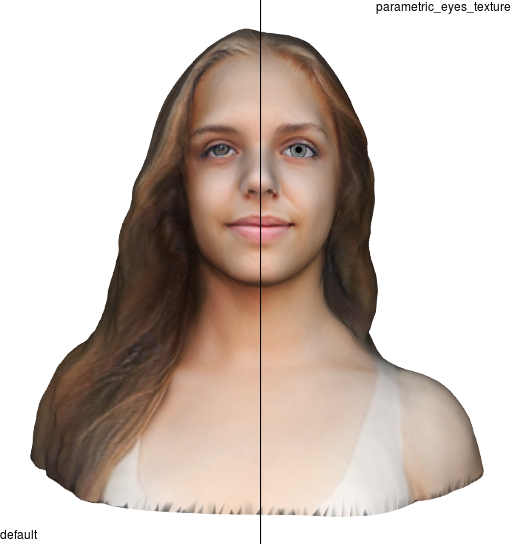
- parametric_eyes_texture : boolean
Replace the eye texture from the submitted photo with the generated one with sclera and iris colors to match the photo version. Please note: always set for the indie/legacy_styled subtype of the animated_face pipeline. See the models comparison below
Models comparison
- remove_smile : boolean
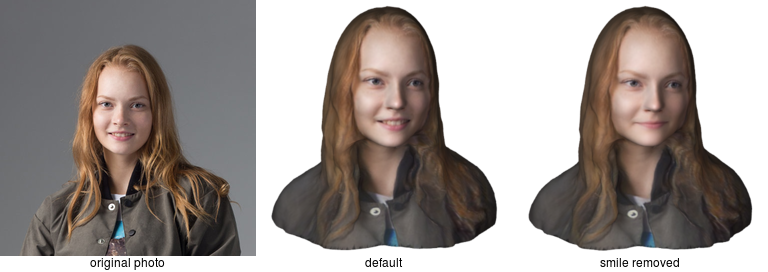
Attempt to remove a smile on the submitted photo before the actual avatar computation starts. Currently detects and removes mostly open smiles (e.g. smiles with mouth open). The status of a smile removal may be obtained later from the model information JSON Object by the remove_smile key (see avatar model information retrieval request). Please find the model comparison below.
Please note: modifies original photo, thus avatars computed on the same source photo with and without this flag may appear slightly different.
Models comparison
- remove_stubble : boolean
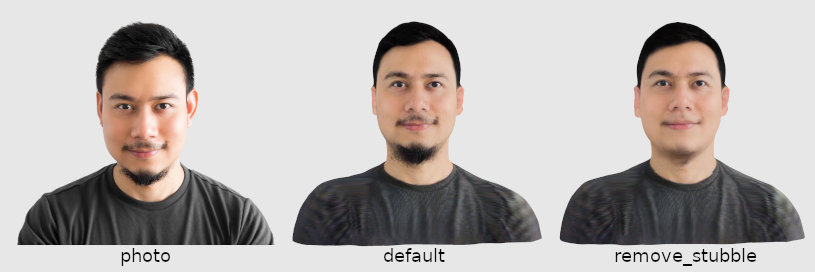
Attempt to remove a stubble on the submitted photo before the actual avatar computation starts. The status of a stubble removal may be obtained later from the model information JSON Object by the remove_stubble key (see avatar model information retrieval request). Please find the model comparison below.
Please note: modifies the original photo, thus avatars computed on the same source photo with and without this flag may appear slightly different.
Models comparison
- remove_glasses : boolean
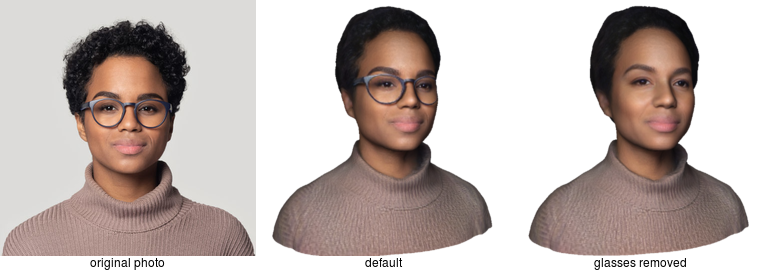
Attempt to remove glasses on the submitted photo before the actual avatar computation starts. The status of glasses removal may be obtained later from the model information JSON Object by remove_glasses key (see avatar model information retrieval request). Please find the model comparison below
Models comparison
- slightly_cartoonish_texture : boolean
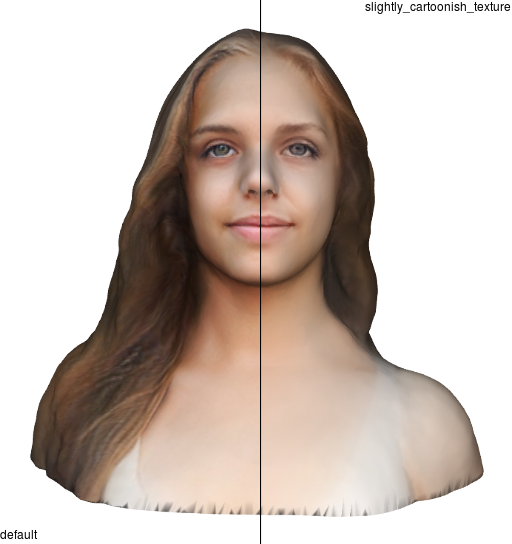
Make the model texture look slightly cartoonish. Please note: replaces original avatar texture. See the models comparison below
Models comparison
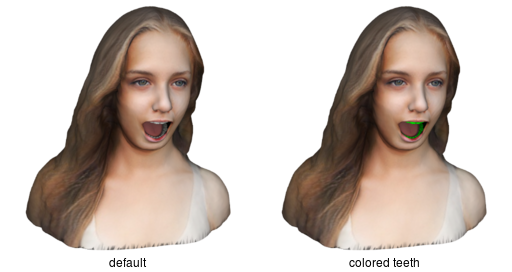
- teeth_color : color [1]
Recolor teeth directly on a model texture. See the models comparison below for {"red": 0, "green": 255, "blue": 0} color
Models comparison
3.2.2.1 Usage examples
- curl
$ curl -H "Authorization: Bearer F88pQWs8hoPzbeCg4xTGifDxxs1eKu" \
       -H "X-PlayerUID: 9418fd52-baef-401c-a2b3-e6fe16d93596" \
       -X POST \
       "https://api.avatarsdk.com/avatars/" \
       -F "pipeline=body_0.3" \
       -F "pipeline_subtype=female" \
       -F "name=modifications test" \
       -F "parameters={\"avatar_modifications\": {\"eye_iris_color\": {\"red\": 146, \"green\": 163, \"blue\": 107}}}" \
       -F "photo=@photo.jpg"
3.2.3 Shape modifications
Similar to avatar modification parameters, see the description for that parameters category.
Please note: all parameters for this category are key-value, and modify the original avatar respectively its description.
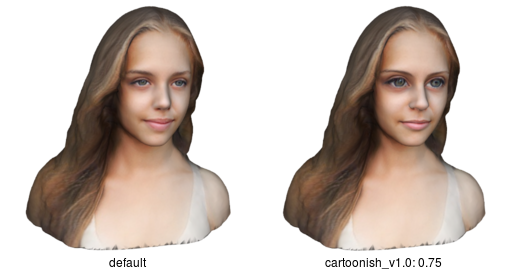
- cartoonish_v1.0 : float
Factor to modify avatar mesh to look more cartoon-like. The valid values range is [0, +∞). The usable values range is model-dependent and usually should be lower than 1
Models comparison
3.2.3.1 Usage examples
- curl
$ curl -H "Authorization: Bearer F88pQWs8hoPzbeCg4xTGifDxxs1eKu" \
       -H "X-PlayerUID: 9418fd52-baef-401c-a2b3-e6fe16d93596" \
       -X POST \
       "https://api.avatarsdk.com/avatars/" \
       -F "pipeline=body_0.3" \
       -F "pipeline_subtype=female" \
       -F "name=modifications test" \
       -F "parameters={\"shape_modifications\": {\"cartoonish_v1.0\": 0.5}}" \
       -F "photo=@photo.jpg"
3.2.4 Body shape
Avatar SDK algorithms predict full body shape by analyzing an input photo and producing an average body for detected parameters. You can optionally specify additional parameters, such as gender, weight, height, etc. Parameters that were not specified will be predicted from an input photo. However, it is recommended to specify as many parameters as possible in order to get a specific body shape.
Please note: the output model may not necessarily have exactly the same measurements as provided by the avatar request. The output measurements are expected to be close to the input body shape parameters that are within the intervals specified by the tables below. Values outside of these intervals may result in significantly different output measurements. We are working to expand these intervals, specifically the one corresponding to the height parameter.
- For FitPerson pipeline subtype only:
Parameter name Gender female male non_binary height [150; 174] [160; 187] [150; 187] weight [54; 86] [70; 112] [54; 112] chest [90; 115] [96; 125] [90; 125] waist [73; 98] [81; 118] [73; 118] hips [90; 116] [93; 119] [90; 119]
Please note: all parameters for this category are key-value, and modify the original avatar respectively to their description.
- gender : string
- Expected model's gender. Available values are female, male, and non_binary. If not specified, gender is autodetected. It is highly recommended to specify this parameter to avoid incorrectly autodetected values.
- height : float
- Expected model's height is in centimeters, is greater than zero. If not specified, height is predicted. It is highly recommended to specify this parameter to avoid incorrectly autodetected values.
- weight : float
- Expected model's weight in kilograms, greater than zero. If not specified, weight is predicted. It is highly recommended to specify this parameter to avoid incorrectly autodetected value.
- chest : float
- Expected model's chest girth is in centimeters, greater than zero. If not specified, chest girth is predicted.
- waist : float
- Expected model's waist girth is in centimeters, greater than zero. If not specified, waist girth is predicted.
- hips : float
- Expected model's hip girth in centimeters, greater than zero. If not specified, hip girth is predicted.
3.2.4.1 Usage examples
- curl
$ curl -H "Authorization: Bearer F88pQWs8hoPzbeCg4xTGifDxxs1eKu" \
       -H "X-PlayerUID: 9418fd52-baef-401c-a2b3-e6fe16d93596" \
       -X POST \
       "https://api.avatarsdk.com/avatars/" \
       -F "pipeline=body_0.3" \
       -F "pipeline_subtype=mobile" \
       -F "name=modifications test" \
       -F "parameters={\"body_shape\": {\"gender\": \"female\", \"height\": 165, \"weight\": 65}}" \
       -F "photo=@photo.jpg"
3.3 Avatar Assets
3.3.1 Haircuts
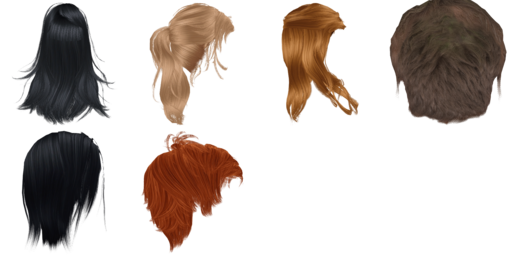
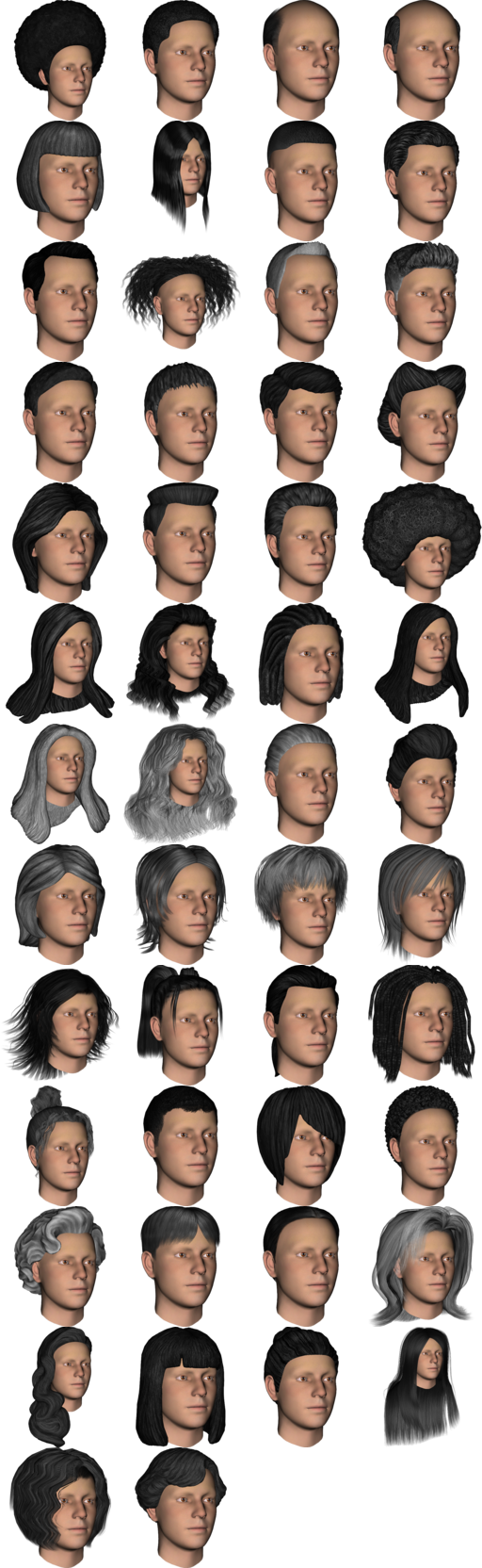
We have four sets of artificial haircuts that are modified during the avatar computation process to match each particular avatar head geometry:
- base set
3 male and 3 female haircuts
Haircuts samples
- plus set
50 haircuts in total, some of them are unisex
Haircuts samples
- generated haircut
- This haircut is unique and generated for each particular avatar to match the haircut from the source photo. Please note: if it is detected that the source photo does not have a haircut (i.e. a bald person) - there will be no generated haircut in the list of available haircuts for the computed avatar.
It is also possible to add your haircut: contact us at support@avatarsdk.com
Please see the parameters retrieval request to retrieve a list of available haircuts for a particular pipeline type and pipeline subtype for your account.
3.3.2 Outfits
Avatar SDK provides artificial outfits for full-body avatars. Each outfit consists of mesh, texture, body visibility mask, roughness, metalness, and normals map. Alpha channel from the body visibility mask should be applied to the avatar body such that the avatar body becomes transparent to avoid body and outfit overlap during avatar animation. Please note: each outfit is provided with a separate body visibility mask, thus the corresponding mask should be applied.
- base set
Set of business, business casual, and casual outfits
Outfits samples
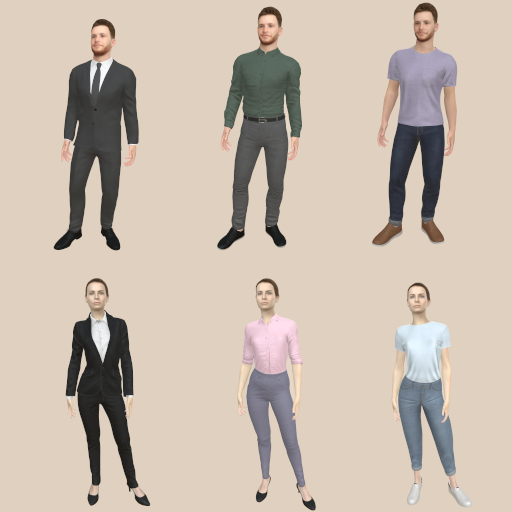
- base_lowpoly set
- The same set as the base but with a lowered polygon count. Outfit name ends with _lowpoly suffix (e.g. outfit_0_lowpoly). Please see the outfit mesh polygons comparison table below for more details about 3D mesh.
- meta set
- The same set as the base but adapted and available only for MetaPerson avatars. Outfit name contains _meta_ suffix (e.g. outfit_meta_0). Please see the outfit mesh polygons comparison table below for more details about 3D mesh.
- meta_lowpoly set
- The same set as the meta but with a lowered polygon count. Outfit name ends with _lowpoly suffix (e.g. outfit_meta_0_lowpoly). Please see the outfit mesh polygons comparison table below for more details about 3D mesh.
Available outfits 3D mesh details for base sets:
| outfit # | base set | base_lowpoly set | ||
|---|---|---|---|---|
| vertices | faces | vertices | faces | |
| 0 | 29815 | 51616 | 6186 | 8880 |
| 1 | 21426 | 39312 | 2872 | 4270 |
| 2 | 32570 | 60102 | 4252 | 6844 |
| 3 | 24655 | 42832 | 4983 | 6626 |
| 4 | 17830 | 30383 | 4518 | 6270 |
| 5 | 27715 | 48362 | 5875 | 9017 |
Available outfits 3D mesh details for meta sets:
| outfit # | meta set | meta_lowpoly set | ||
|---|---|---|---|---|
| vertices | faces | vertices | faces | |
| 0 | 26840 | 46147 | 6222 | 9006 |
| 1 | 21576 | 39312 | 2961 | 4432 |
| 2 | 29341 | 54090 | 4295 | 6885 |
| 3 | 23427 | 40894 | 5197 | 6995 |
| 4 | 15345 | 25105 | 4700 | 6548 |
| 5 | 23123 | 40524 | 5884 | 9019 |
Please see the enumerable export parameters retrieval request to retrieve a list of available outfits.
3.3.2.1 Parameters availability
| Parameter Name | Pipeline / Pipeline Subtype | |
|---|---|---|
| body_0.3 | ||
| female, male | mobile | |
| base set | ✓ | |
| base_lowpoly set | ✓ | |
| meta set | ✓ | |
| meta_lowpoly set | ✓ | |
3.3.3 Blendshapes
Different blendshapes sets are available, depending on your use case: general animation, lip-sync, overall avatar shape modification, etc. Please consult each blendshapes set description for more information.
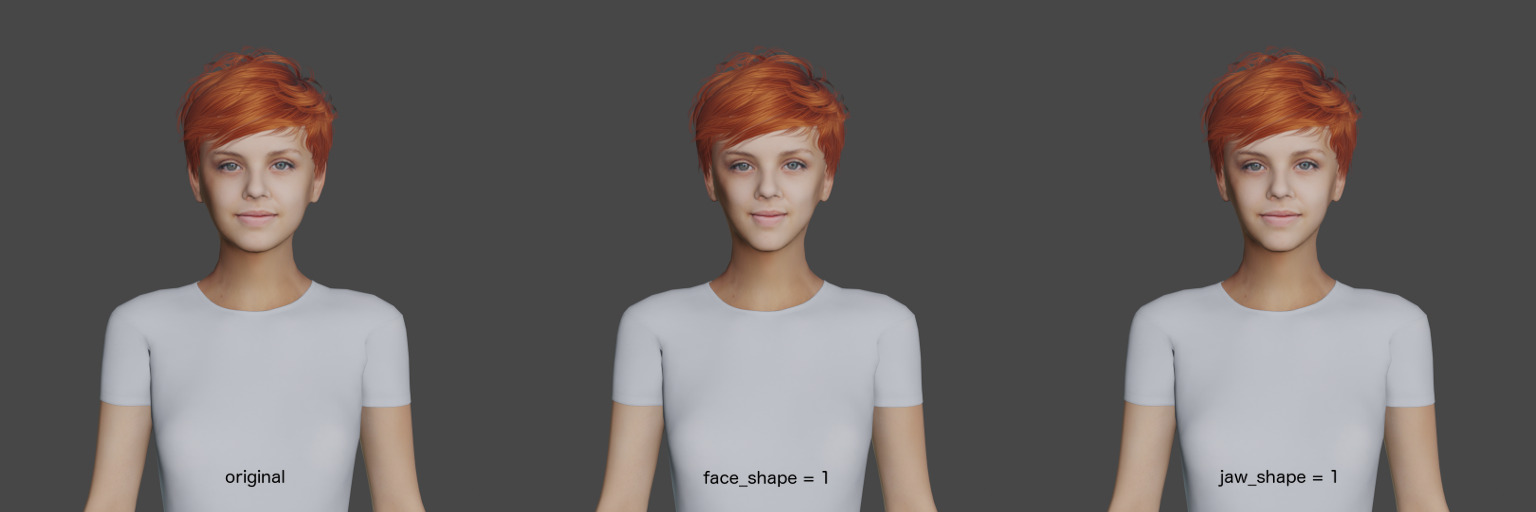
- face_modifications_2
Set of 2 blendshapes (face_shape and jaw_shape) to modify the facial shape. Please see the renders below:
face_modifications_2 samples
- mobile_51
Set of 51 facial blendshapes. This set is compatible with Apple ARKit: https://developer.apple.com/documentation/arkit/creating_face-based_ar_experiences
blendshapes names
browDownLeft, browDownRight, browInnerUp, browOuterUpLeft, browOuterUpRight, cheekPuff, cheekSquintLeft, cheekSquintRight, eyeBlinkLeft, eyeBlinkRight, eyeLookDownLeft, eyeLookDownRight, eyeLookInLeft, eyeLookInRight, eyeLookOutLeft, eyeLookOutRight, eyeLookUpLeft, eyeLookUpRight, eyeSquintLeft, eyeSquintRight, eyeWideLeft, eyeWideRight, jawForward, jawLeft, jawOpen, jawRight, mouthClose, mouthDimpleLeft, mouthDimpleRight, mouthFrownLeft, mouthFrownRight, mouthFunnel, mouthLeft, mouthLowerDownLeft, mouthLowerDownRight, mouthPressLeft, mouthPressRight, mouthPucker, mouthRight, mouthRollLower, mouthRollUpper, mouthShrugLower, mouthShrugUpper, mouthSmileLeft, mouthSmileRight, mouthStretchLeft, mouthStretchRight, mouthUpperUpLeft, mouthUpperUpRight, noseSneerLeft, noseSneerRight- visemes_15
- Set of 14 visemes (PP, FF, TH, DD, kk, CH, SS, nn, RR, aa, E, ih, oh, ou) and one additional blendshape: Laughter. This set is identical to Oculus Lipsync visemes. You can find more details here: https://developer.oculus.com/documentation/audiosdk/latest/concepts/book-audio-ovrlipsync/
Please find our guides on how to use visemes for lipsync here: https://docs.avatarsdk.com/unity-plugin/3.0.1/additional_samples.html
3.4 Export parameters
Avatar's export parameters contain a set of flags and parameters to specify what resulting avatar downloadable data should include: model format, set of textures, blendshapes, whether to embed all these assets into the one model or save as separate files, etc.
The general format for export parameters is the following:
{
  "flag": value,

  "category": {
    "list": [values],
    "flag": value
  }
}
Export parameters consist of top-level and category-level flags. Top-level flags are applied to the whole avatar and its categories (unless stated otherwise). Category-level flags are applied only to this particular category and overwrite top-level flags if they are of the same name and specified explicitly.
The category may contain enumerable values (like haircuts). These values must be specified within the list key of this particular category. Please look at the enumerable export parameters retrieval request to retrieve a list of available export parameters for each particular category for the pipeline and the pipeline's subtype for your account. Please note: to avoid ambiguity in specifying different computation and enumerable export parameters (i.e., haircuts and blendshapes), export parameters take precedence.
All flags and values are optional and replaced by default values if not specified explicitly. Default export parameters are the following:
{
  "format": "gltf",
  "embed" : true,
  "pointclouds" : false,
  "additional_textures" : [],
  "embed_textures": false,
  "texture_size" : null,         // i.e. maximum available
  "template": "",                // i.e. default template
  "lod": 0,                      // i.e. maximum available

  "haircuts": {
    "list": [],
    "format": null,              // i.e. top-level format
    "embed": null,               // i.e. top-level value
    "pointclouds": null,         // i.e. top-level value
    "color": null,
    "texture_size" : null,       // i.e. top-level size
    "embed_textures": null       // i.e. top-level value
  },

  "outfits": {
    "list": [],
    "format": null,              // i.e. top-level format
    "embed": null,               // i.e. top-level value
    "pointclouds": null,         // i.e. top-level value
    "additional_textures" : [],
    "texture_size" : null,       // i.e. top-level size
    "embed_textures": null       // i.e. top-level value
  }

  "blendshapes": {
    "list": [],
    "format": null,              // i.e. top-level format
    "embed": null,               // i.e. top-level value
    "pointclouds": null          // i.e. top-level value
  }
}
3.4.1 Available flags
- additional_textures : list
List of textures to export besides the default diffuse model texture. Available values are:
- normal_map
- roughness_map
- metallic_map
For the outfits section body_visibility_mask is also available (see outfits section for visibility mask information).
- color : color [1]
- If texture supports recoloring, this flag specifies the base color for the recoloring process
- embed_textures : boolean
- If the format supports texture embedding (i.e. fbx or glb), this flag indicates whether to embed textures or store them as separate files. If avatar format does not support texture embedding - the flag is set to false and textures are saved as separate files
- format : string
- File format for the resulting mesh. The top-level flag defines the format of the avatar, category-level flag defines the format of the mesh for this particular category. Currently supported options include gltf, glb, fbx, obj, ply, and bin (blendshapes only)
- list : list
- List of enumerable values of assets to export for this particular category. Please see the enumerable export parameters retrieval request to retrieve a list of available enumerable export parameters for each particular category for pipeline and pipeline subtype on your account
- lod : integer
- Level of details for exported mesh. Please find more information on mesh properties in the LOD table for each particular pipeline description in the available pipelines section. See also FAQ
- pointclouds : boolean
If set to true, then the resulting model file will not contain mesh faces and UV mapping (i.e. it will contain only mesh vertices).
For meshes with regular topology (i.e. models where a number of vertices, edges, and how these vertices connected are the same, only vertices positions are different), it may be convenient to download full mesh only once and then download and replace only pointclouds (only vertices) for all future models to reduce the download data size
- template : string
- Apply particular avatar export template. Currently, only one additional template is supported: the head, which is effectively the head/mobile subtype of the head_2.0 pipeline.
- texture_size : size [2]
Resize texture to the specified size. The avatar texture size is 4096x2048 px. Most asset textures are 4096x4096 px for outfits and 2048x2048 px for haircuts, but size varies between assets. Please check the original texture size before setting a custom value as setting it greater than the original one will not result in improved texture quality.
Please note: if texture size is also set in avatar modification parameters - then texture is resized according to avatar modifications first, and then according to export parameters.
3.4.2 Export files
When export parameters are specified, algorithms generate export which consists of one or several export files depending on specified export parameters flags. In order to download all avatar's data, all files within one export have to be downloaded. Export file names are unique within one export and consistent from avatar to avatar export thus you may set priority to download export files in your application: e.g. avatar itself first, then its haircuts, etc.
Please see the avatar exports list request to find out how to list available avatar exports and their export files.
| [1] | (1, 2, 3, 4, 5, 6, 7, 8) Color is represented as a JSON object with red, green, and blue keys and [0, 255] values inclusive for corresponding color channels. E.g. {"red": 222, "green": 173, "blue": 190} |
| [2] | (1, 2) Size is represented as a JSON object with width and height keys and positive integer values. E.g. {"width": 256, "height": 256} |
4 Methods
4.1 Players
Player model DTO [*]:
{
  // Absolute URL to this DTO
  "url": string,

  // Player unique identifier (PlayerUID)
  "code": string,

  // ISO 8601 datetime
  "created_on": string,

  // May be used to contain arbitrary information for your taste
  "comment": string
}
| [*] | DTO is an acronym for Data Transfer Object |
4.1.1 List
- Method
- GET
- URL
- /players/
- Description
- Retrieve a paginated list of registered players available for your developer account. Available only in developer access mode. See the pagination section for paginated response details. See the response example below:
[
  {
    "url":"https://api.avatarsdk.com/players/9418fd52-baef-401c-a2b3-e6fe16d93596/",
    "code":"9418fd52-baef-401c-a2b3-e6fe16d93596",
    "created_on":"2017-04-03T04:08:15.589833Z",
    "comment":""
  },
  ...
]
- Filters
- created_before - filter Players with creation datetime before specified one (inclusive)
- created_after - filter Players with creation datetime after specified one (inclusive)
- comment - filter by part of the Player comment
4.1.2 Retrieve
- Method
- GET
- URL
- /players/{code}/
- Description
- Retrieve a particular instance of Player identified by code URL part. See player DTO for the response format description. Available in developer and client access modes.
4.1.3 Create
- Method
- POST
- URL
- /players/
- Description
- Register a new Player. See player DTO for the response format description. Available in developer and client access modes.
- Request parameters
- No request parameters are required.
4.2 Parameters
Parameters DTO:
{
  // Category of parameters. E.g. 'haircuts', 'blendshapes', etc.
  "category": {
    // Group of parameters. E.g. pricing plan or customer-specific group
    "group": [
      // List of parameter names
      "name",
      ...
    ]
  },
  ...
}
4.2.1 Retrieve
- Method
- GET
- URL
- /parameters/(available | default)/{pipeline}/
- Description
Retrieve all available or default parameters for specified pipeline and default pipeline subtype. Use filters to retrieve parameters for the non-default pipeline subtype. The response is one key-value pair with pipeline_subtype as a key and parameters as a value.
Parameters may be just copy-pasted as-is (or partially) into the parameters field of create avatar request parameters. The only exception is the avatar_modifications parameters category: this category contains key-value parameters. See the avatar modification parameters section for details.
Please see the example response below (a little bit shortened for the sake of simplicity):
{
  "base/legacy": {
    "blendshapes": {
      "base": [
        "legacy_45",
        "visemes_17"
      ]
    },
    "haircuts": {
      "base": [
        "female_NewSea_J086f",
        "female_NewSea_J096f",
        "female_NewSea_J123f",
        "male_NewSea_J003m",
        "male_NewSea_J082m",
        "male_makehuman_short02"
      ],
      "facegen": [
        "facegen_afro",
        "facegen_balding",
        ...
        "facegen_wavy_shag"
      ]
    }
  }
}
- Filters
- pipeline_subtype - filter by non-default pipeline subtype. See available pipelines for details about available pipeline subtypes
4.3 Enumerable export parameters
Enumerable export parameters DTO:
{
    // export parameters category
    "category": [
        // list of enumerable parameters
        values
    ],
    ...
}
4.3.1 Retrieve
- Method
- GET
- URL
/export_parameters/available/{pipeline}/
Retrieve all available enumerable export parameters for specified pipeline and a pipeline subtype. Use filters to retrieve parameters for the non-default pipeline subtype. The response is a JSON object of available enumerable values for each export parameters category.
Please see the example response below (a little bit shortened for the sake of simplicity):
{
    "blendshapes": [
        "mobile_51",
        "visemes_15"
    ],
    "haircuts": [
        "generated",
        ...
        "wavy_bob"
    ]
}
- Filters
- pipeline_subtype - filter by subtype. See available pipelines for details about available pipeline subtypes
4.4 Avatars
Avatar model DTO:
{
  // Absolute URL to this DTO
  "url": string,

  // Avatar identifier
  "code": string,

  // Avatar models computing status. One of [Uploading, Queued, Computing, Completed, Failed, Timed Out]
  "status": string,

  // Current progress of avatar status. In rage [0:100]
  "progress": integer,

  // Avatar name
  "name": string,

  // Pipeline used to calculate avatar
  "pipeline": string,

  // Avatar description
  "description": string,

  // ISO 8601 datetime
  "created_on": string,

  // ISO 8601 last change datetime. May be `null` if it hasn't changed yet since the creation
  "ctime": string,

  // Absolute URL to retrieve Avatar source image thumbnail
  "thumbnail": string,

  // Absolute URL to retrieve JSON object with this avatar meta-information
  "model_info": string,

  // Absolute URL to retrieve a list of available avatar exports for this avatar model
  "exports": string
}
4.4.1 List
- Method
- GET
- URL
- /avatars/
- Description
- Retrieve a paginated list of available avatar models for your account. Available in developer and client access modes. In the client access mode list of avatars is restricted to models created by specified PlayerUID. See the pagination section for paginated response details. See the response example below:
[
  {
    "url":"https://api.avatarsdk.com/avatars/b63f9737-8594-460a-99a4-74e60b042bd4/",
    "code":"b63f9737-8594-460a-99a4-74e60b042bd4",
    "status":"Completed",
    "progress":100,
    "name":"Leo",
    "pipeline": "animated_face",
    "description":"",
    "created_on":"2017-04-03T04:08:15.589833Z",
    "ctime":null,
    "mesh":"https://api.avatarsdk.com/avatars/b63f9737-8594-460a-99a4-74e60b042bd4/mesh/",
    "texture":"https://api.avatarsdk.com/avatars/b63f9737-8594-460a-99a4-74e60b042bd4/texture/",
    "thumbnail":"https://api.avatarsdk.com/avatars/b63f9737-8594-460a-99a4-74e60b042bd4/thumbnail/",
    "haircuts":"https://api.avatarsdk.com/avatars/b63f9737-8594-460a-99a4-74e60b042bd4/haircuts/",
    "blendshapes":"https://api.avatarsdk.com/avatars/b63f9737-8594-460a-99a4-74e60b042bd4/blendshapes/"
  },
  ...
]
- Filters
- name - filter by part of the avatar name
- description - filter by part of the avatar description
- status - filter by part of the avatar status
- created_before - filter avatars with creation datetime before specified one (inclusive)
- created_after - filter avatars with creation datetime after specified one (inclusive)
- changed_before - filter avatars with change datetime before specified one (inclusive)
- changed_after - filter avatars with change datetime after specified one (inclusive)
- pipeline - filter by used pipeline
4.4.2 Retrieve
- Method
- GET
- URL
- /avatars/{code}/
- Description
- Retrieve a particular instance of avatar identified by the code URL part. See avatar DTO for the response format description. Available in developer and client access modes.
4.4.3 Create
- Method
- POST
- URL
- /avatars/
- Description
Create a new avatar calculation task. Available in developer and client access modes. After POSTing a request, the avatar photo for the calculation is uploaded to the calculation backend (state Uploading), then Queued until a free calculation backend is found, then Computing, and finally Completed.
In some cases, the calculation task may be Failed due to a bad (blurry/dark/etc.) photo being submitted or for some other reasons. In rare cases task may be Timed out - calculation took too long time.
It is your responsibility to poll the avatar calculation task for progress (status and progress fields of avatar DTO). Access to the URL fields of the incomplete avatar will not succeed.
- Request parameters
Accepts multipart/form-data requests with the following fields:
name - new avatar name
description - new avatar description
photo - new avatar source photo. Either a photo or a selfie must be provided. Error is returned if none or both are provided
selfie - selfie code. Please see the selfies section to learn more about selfies. Either a selfie or a photo must be provided. Error is returned if none or both are provided. Error is returned if the selfie file has not uploaded yet by the end-user
pipeline - an optional field to specify which pipeline to use for new avatar generation. Please see the the available pipelines for the list of possible field values. The assumed value is animated_face if the form field is not provided
pipeline_subtype - modification of pipeline. Please see available pipelines for the list of possible field values
parameters - specific parameters to compute for the submitted avatar. See parameters DTO for this field format. If no value is submitted - it is replaced with default parameters for the specified pipeline and (optionally) pipeline subtype. See the parameters retrieval request to find out default/available parameters for pipeline type/subtype pairs. If no parameters are required to compute the avatar - submit an empty JSON object: {}
export_parameters - parameters to specify what resulting avatar downloadable data should include: like model format, set of textures, blendshapes, whether to embed all these assets into the one model or save as separate files, etc. Please see the export parameters section to find out more.
Please note: if this section is empty- no avatar exports will be created.
export_comment - avatar export comment. An arbitrary string, note to self, etc.
4.4.4 Update
- Method
- PATCH, PUT
- URL
- /avatars/{code}/
- Description
- Update the name/description of the particular avatar model identified by the code URL part. The PATCH method supports partial update (e.g. only one field may be submitted), PUT method requires both fields to be submitted. Available in developer and client access modes. In client access mode restricted to avatars created by specified PlayerUID.
- Request parameters
Accepts multipart/form-data requests with the following fields:
- name - new avatar name
- description - new avatar description
4.4.5 Delete
- Method
- DELETE
- URL
- /avatars/{code}/
- Description
- Delete the particular avatar model identified by the code URL part. Available in developer and client access modes. In client access mode restricted to avatars created by specified PlayerUID.
4.5 Avatars count
4.5.1 Retrieve
- Method
- GET
- URL
- /avatars/count/
- Description
Retrieve the number of avatars created (created field), the number of free avatars left (i.e. included in your billing plan, prepaid field), and the number of avatars to be paid (to_pay field) in the current billing period.
The time frame to count avatars may be specified with since and until filters. In this case, only the number of created avatars is returned.
Please see the example response below:
{
  "created": 8192,
  "prepaid": 0,
  "to_pay": 2192
}
- Filters
- since - count avatars created after the specified date (inclusive), iso8601 format
- until - count avatars created before the specified date (exclusive), iso8601 format
4.6 Avatar thumbnail
4.6.1 Retrieve
- Method
- GET
- URL
- /avatars/{code}/thumbnail/
- Description
- Retrieve the thumbnail of the submitted for calculations avatar photo.
- Request Parameters
- max_w - limit thumbnail width, in range (0, 1024]
- max_h - limit thumbnail height, in range (0, 1024]
4.7 Avatar model information
4.7.1 Retrieve
- Method
- GET
- URL
- /avatars/{code}/model_info/
- Description
Retrieve JSON object with avatar model meta-information requested on avatar creation. Please see the model info parameters section for available parameters.
Please see the example response below:
{
    "age": "not_child",
    "age_confidence": 1,
    "gender": "female",
    "gender_confidence": 0.9999961853027344,
    "hair_color": {
        "blue": 114,
        "green": 145,
        "red": 199
    },
    "pipeline": "body_0.3",
    "pipeline_subtype": "female",
    "skin_color": {
        "blue": 151,
        "green": 181,
        "red": 235
    }
}
4.8 Selfies
For some applications, it may be the case, that the camera or selfie photo is not available within the same device (e.g. an application on a desktop computer without an attached web camera). At the same time, almost everyone has cameras or selfies on his/her mobile phone, but it may be inconvenient to transfer these photos to the device with the application.
The solution is to create a selfie upload page, visit it within the mobile device, and upload a new or existing selfie photo. For end-user convenience, the QR code with the upload page URL is also available. After uploading the photo, the application could download the photo and continue its workflow of avatar creation. It is also possible to avoid the photo download step by passing the selfie code into the avatar creation request directly.
Please note: only one photo can be uploaded per selfie upload page. To upload a new photo, a new selfie upload page must be created.
Selfie model DTO:
{
  // Selfie code
  "code": string,

  // ISO 8601 datetime after which, the selfie will be unavailable (24 hours currently)
  "expires": string,

  // Absolute URL to selfie file
  "file_url": string,

  // Absolute URL to QR code file with selfie upload page URL
  "upload_page_qr": string,

  // Absolute URL to selfie upload page
  "upload_page_url": string,

  // Flag indicates whether the upload page visited
  "upload_page_visited": boolean,

  // Absolute URL to this DTO
  "url": string
}
4.8.1 Create
- Method
- POST
- URL
- /selfies/
- Description
- Create a new selfie upload page. Please see the selfie DTO for the response format.
4.8.2 Retrieve QR code
- Method
- GET
- URL
- /selfies/{code}/qr/
- Description
- Retrieve the QR code with the upload page URL as a PNG image file.
4.8.3 Retrieve
- Method
- GET, HEAD
- URL
- /selfies/{code}/file/
- Description
- Retrieve end-user photo. If the end-user has not uploaded the file yet, the request will end with HTTP 204 NO CONTENT. It is convenient to check file status with a HEAD request first and download it with a GET request once the HTTP 200 response code is returned.
4.9 Avatar exports
Avatar export DTO:
{
  // Avatar identifier
  "avatar_code": string,

  // Avatar export identifier
  "code": string,

  // Avatar export comment, may be `null` if not present
  "comment": string,

  // ISO 8601 datetime
  "created_on": string,

  // List of Avatar Export files
  "files": [

    // Avatar Export file
    {
      // Category of Avatar Export file
      "category": string,

      // Absolute URL to retrieve the Avatar Export file zip archive
      "file": string,

      // Avatar Export file identifier
      "identity": string,

      // List of Static files for Avatar Export file
      "static_files": [

        // absolute URL to retrieve Static file
        string
      ]
    },

    ...
  ],

  // Status of Avatar Export. One of [Queued, Computing, Completed, Failed]
  "status": string,

  // Absolute URL to this DTO
  "url": string
}
4.9.1 List
- Method
- GET
- URL
- /avatars/{code}/exports/
- Description
- Retrieve a list of all available Avatar exports for a particular Avatar. The code key identifies the particular Avatar export. Please see the example response below:
[
    {
        "avatar_code": "e56d6044-fdbf-4cbf-86df-793bf21494f4",
        "code": "c0fc0ece-e291-4bbe-bdf2-ece270e0e065",
        "created_on": "2020-11-16T12:57:03.641470Z",
        "files": [
            {
                "category": null,
                "file": "https://api.avatarsdk.com/avatars/e56d6044-fdbf-4cbf-86df-793bf21494f4/exports/c0fc0ece-e291-4bbe-bdf2-ece270e0e065/files/avatar/file/",
                "identity": "avatar",
                "static_files": []
            },
            {
                "category": "haircuts",
                "file": "https://api.avatarsdk.com/avatars/e56d6044-fdbf-4cbf-86df-793bf21494f4/exports/c0fc0ece-e291-4bbe-bdf2-ece270e0e065/files/generated/file/",
                "identity": "generated",
                "static_files": []
            },
            {
                "category": "blendshapes",
                "file": "https://api.avatarsdk.com/avatars/e56d6044-fdbf-4cbf-86df-793bf21494f4/exports/c0fc0ece-e291-4bbe-bdf2-ece270e0e065/files/mobile_51/file/",
                "identity": "mobile_51",
                "static_files": []
            },
            {
                "category": "haircuts",
                "file": "https://api.avatarsdk.com/avatars/e56d6044-fdbf-4cbf-86df-793bf21494f4/exports/c0fc0ece-e291-4bbe-bdf2-ece270e0e065/files/afro/file/",
                "identity": "afro",
                "static_files": [
                    "https://api.avatarsdk.com/avatars/e56d6044-fdbf-4cbf-86df-793bf21494f4/exports/c0fc0ece-e291-4bbe-bdf2-ece270e0e065/files/afro/static_files/texture.png"
                ]
            }
        ],
        "status": "Completed",
        "url": "https://api.avatarsdk.com/avatars/e56d6044-fdbf-4cbf-86df-793bf21494f4/exports/c0fc0ece-e291-4bbe-bdf2-ece270e0e065/"
    }
]
4.9.2 Retrieve
- Method
- GET
- URL
- /avatars/{code}/exports/{export_code}/files/{export_file}/file/
- Description
Retrieve a particular Avatar export file. Avatar is identified by the code URL part, Avatar export is identified by the export_code URL part, and the export file is identified by the export_file URL part. Please see the avatar export DTO to see where to find each URL part.
Please note: all export files and their static files must be downloaded to retrieve full Avatar export.
4.9.3 Create
- Method
- POST
- URL
- /avatars/{code}/exports/
- Description
Create a subsequent avatar export on already Completed avatar. Please see the avatar export DTO section for the response format. May be useful to create an avatar export with a different list of assets.
After POSTing a request, the avatar export task is created and being transitioned through the following states: Queued, Computing, Completed, Failed. It is your responsibility to poll the avatar export task for the progress.
- Request parameters
Accepts multipart/form-data requests with the following fields:
- parameters - avatar export parameters. Please see the export parameters section for the format description. Must be a non-empty JSON object
- comment - avatar export comment. An arbitrary string, note to self, etc.