Curl tutorial: selfie upload page (MetaPerson 2.0)
This page contains a step-by-step tutorial on how to retrieve OAuth Bearer token, create an selfie upload page, poll selfie file status, create a Player, create an avatar from selfie, poll its status and download its mesh, texture, blendshapes, haircuts and avatar info using the curl command line utility.
To obtain curl utility for Windows, please visit the following page: https://curl.se/windows/. Please consult your Linux/macOS distributive packaging system help to install curl utility.
Please note that code samples syntax is different for Windows and for Linux/macOS platforms, thus see the corresponding sample section for your platform by clicking on the platform title.
Authorization
Go to https://accounts.avatarsdk.com/developer/ (create an application if you have no application yet), copy App Client ID and App Client Secret from Client Access application to the corresponding variables. Please make sure you have set Authorization Grant to Client credentials. Set the TOKEN variable to the access_token value after successful authorization. Please note, that token will expire in 36000 seconds and you will need to run the authorization procedure again.
- Windows
SET "CLIENT_ID=iCM5o..."
SET "CLIENT_SECRET=S8TM5..."
curl -X POST --user "%CLIENT_ID%:%CLIENT_SECRET%" ^
     "https://api.avatarsdk.com/o/token/" ^
     -F "grant_type=client_credentials"

{
  "access_token": "PAvD64lbikgVA0GzxgKV2ZhLnPbZ8P",
  "token_type": "Bearer",
  "expires_in": 36000,
  "scope": "read write"
}

SET "TOKEN=PAvD64lbikgVA0GzxgKV2ZhLnPbZ8P"
- Linux
CLIENT_ID="iCM5o..."
CLIENT_SECRET="S8TM5..."
curl -X POST --user "$CLIENT_ID:$CLIENT_SECRET" \
     "https://api.avatarsdk.com/o/token/" \
     -F "grant_type=client_credentials"

{
  "access_token": "PAvD64lbikgVA0GzxgKV2ZhLnPbZ8P",
  "token_type": "Bearer",
  "expires_in": 36000,
  "scope": "read write"
}

TOKEN="PAvD64lbikgVA0GzxgKV2ZhLnPbZ8P"
Create a Player ID
Create a Player ID that will own all future avatars. Please note, that the Player ID does not expire.
- Windows
curl -H "Authorization: Bearer %TOKEN%" ^
     -X POST ^
     "https://api.avatarsdk.com/players/" ^
     -F "comment=curl sample"

{
  "url": "https://api.avatarsdk.com/players/16322807-89e3-4223-a83c-1d6afa8abd11/",
  "code": "16322807-89e3-4223-a83c-1d6afa8abd11",
  "created_on": "2020-01-14T07:09:55.976235Z",
  "comment": "curl sample"
}

SET "PLAYER=16322807-89e3-4223-a83c-1d6afa8abd11"
- Linux
curl -H "Authorization: Bearer $TOKEN" \
     -X POST \
     "https://api.avatarsdk.com/players/" \
     -F "comment=curl sample"

{
  "url": "https://api.avatarsdk.com/players/16322807-89e3-4223-a83c-1d6afa8abd11/",
  "code": "16322807-89e3-4223-a83c-1d6afa8abd11",
  "created_on": "2020-01-14T07:09:55.976235Z",
  "comment": "curl sample"
}

PLAYER="16322807-89e3-4223-a83c-1d6afa8abd11"
Create a selfie upload page
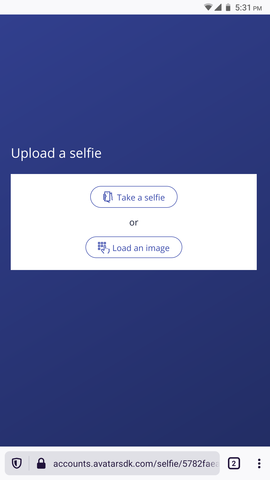
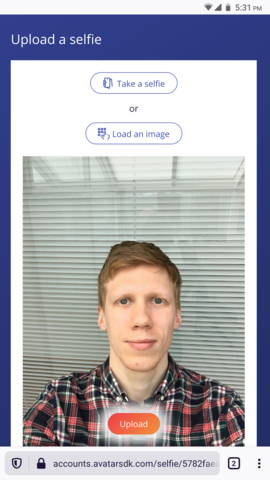
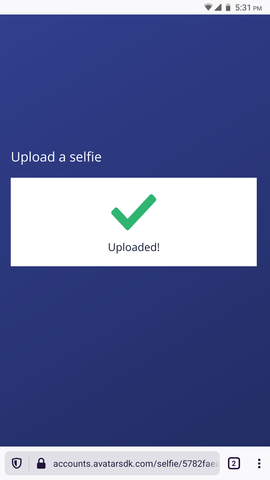
Create a selfie upload page that end-user should visit to upload his or her photo:
Selfie upload page sample workflow
- Windows
curl -H "Authorization: Bearer %TOKEN%" ^
     -X POST ^
     "https://api.avatarsdk.com/selfies/"

{
  "code": "5782faea-7762-4170-b5f0-d74b0e49d924",
  "expires": "2020-12-24T07:36:48.295675Z",
  "file_url": "https://api.avatarsdk.com/selfies/5782faea-7762-4170-b5f0-d74b0e49d924/file/",
  "upload_page_qr": "https://api.avatarsdk.com/selfies/5782faea-7762-4170-b5f0-d74b0e49d924/qr/",
  "upload_page_url": "https://accounts.avatarsdk.com/dashboard/selfie/5782faea-7762-4170-b5f0-d74b0e49d924/",
  "upload_page_visited": false,
  "url": "https://api.avatarsdk.com/selfies/5782faea-7762-4170-b5f0-d74b0e49d924/"
}

SET "SELFIE=5782faea-7762-4170-b5f0-d74b0e49d924"
- Linux
curl -H "Authorization: Bearer $TOKEN" \
     -X POST \
     "https://api.avatarsdk.com/selfies/"

{
  "code": "5782faea-7762-4170-b5f0-d74b0e49d924",
  "expires": "2020-12-24T07:36:48.295675Z",
  "file_url": "https://api.avatarsdk.com/selfies/5782faea-7762-4170-b5f0-d74b0e49d924/file/",
  "upload_page_qr": "https://api.avatarsdk.com/selfies/5782faea-7762-4170-b5f0-d74b0e49d924/qr/",
  "upload_page_url": "https://accounts.avatarsdk.com/dashboard/selfie/5782faea-7762-4170-b5f0-d74b0e49d924/",
  "upload_page_visited": false,
  "url": "https://api.avatarsdk.com/selfies/5782faea-7762-4170-b5f0-d74b0e49d924/"
}

SELFIE="5782faea-7762-4170-b5f0-d74b0e49d924"
Retrieve a QR code with selfie upload page URL
Retrieve ready to display QR code image in PNG file format:
QR code sample

- Windows
curl -H "Authorization: Bearer %TOKEN%" ^
     -X GET ^
     "https://api.avatarsdk.com/selfies/%SELFIE%/qr/" ^
     -o "qr.png"
- Linux
curl -H "Authorization: Bearer $TOKEN" \
     -X GET \
     "https://api.avatarsdk.com/selfies/$SELFIE/qr/" \
     -o "qr.png"
Poll selfie status
Request the selfie file status periodically (once per 5 seconds should be enough) to check whether it was uploaded:
- Windows
curl -H "Authorization: Bearer %TOKEN%" ^
     -I ^
     "https://api.avatarsdk.com/selfies/%SELFIE%/file/"

HTTP/1.0 204 NO CONTENT
- Linux
curl -H "Authorization: Bearer $TOKEN" \
     -I \
     "https://api.avatarsdk.com/selfies/$SELFIE/file/"

HTTP/1.0 204 NO CONTENT
Once the selfie photo is uploaded, HTTP 200 is returned:
- Windows
curl -H "Authorization: Bearer %TOKEN%" ^
     -I ^
     "https://api.avatarsdk.com/selfies/%SELFIE%/file/"

HTTP/1.0 200 OK
- Linux
curl -H "Authorization: Bearer $TOKEN" \
     -I \
     "https://api.avatarsdk.com/selfies/$SELFIE/file/"

HTTP/1.0 200 OK
Query available parameters
There are several avatar computation time parameters, which may improve the resulting avatar quality, and customize it as well as purely informational ones. Please find more information on the computational parameters here: Computation parameters.
To retrieve a list of available parameters for the female subtype of metaperson_2.0 pipeline, run the parameters retrieval request with the the TOKEN obtained on the authorization step:
- Windows
curl -H "Authorization: Bearer %TOKEN%" ^
     -X GET ^
     "https://api.avatarsdk.com/parameters/available/metaperson_2.0/?pipeline_subtype=female"

{
    "female": {
        "avatar_modifications": [
            "remove_smile",
            "remove_glasses",
            "remove_stubble"
        ],
        "model_info": [
            "gender",
            "race",
            "age",
            "hair_color",
            "skin_color",
            "eye_sclera_color",
            "eye_iris_color"
        ]
    }
}
- Linux
curl -H "Authorization: Bearer $TOKEN" \
     -X GET \
     "https://api.avatarsdk.com/parameters/available/metaperson_2.0/?pipeline_subtype=female"

{
    "female": {
        "avatar_modifications": [
            "remove_smile",
            "remove_glasses",
            "remove_stubble"
        ],
        "model_info": [
            "gender",
            "race",
            "age",
            "hair_color",
            "skin_color",
            "eye_sclera_color",
            "eye_iris_color"
        ]
    }
}
Please note, that this request is useful only during parameter discovery and should be omitted during normal application workflow once you figure out which parameters fit you best.
Query available enumerable export parameters
To obtain a computed avatar in one of the common 3D mesh file formats as well as customize avatar parts and assets you will need to specify export parameters. Export parameters for a particular pipeline type consist of various flags (like mesh file format, level of mesh details, etc.) and enumerable parameters that vary depending on the pipeline subtype (like avatar body parts, textures, outfits, etc.) Please find more information on export parameters here: Export parameters. Please also find frequently asked questions on export parameters usage here: FAQ.
To retrieve a list of available enumerable export parameters for the female subtype of metaperson_2.0 pipeline, run enumerable export parameters retrieval request with the TOKEN obtained on the authorization step:
- Windows
curl -H "Authorization: Bearer %TOKEN%" ^
     -X GET ^
     "https://api.avatarsdk.com/export_parameters/available/metaperson_2.0/?pipeline_subtype=female"

{
  "blendshapes": {
    "list": [
      "body_shape",
      "face_modifications",
      "mobile_51",
      "visemes_14",
      "visemes_15"
    ]
  },
  "outfits_shoes": {
    "textures": [
      "BodyVisibilityMask",
      "Color",
      "GltfMetallicRoughness",
      "Normal",
      "Roughness",
      "UnityMetallicSmoothness"
    ],
    "list": [
      "sneakers_ARPI",
      "sneakers_AZAT"
    ]
  },
  "outfits": {
    "textures": [
      "BodyVisibilityMask",
      "Color",
      "GltfMetallicRoughness",
      "HeadVisibilityMask",
      "Normal",
      "Roughness",
      "UnityMetallicSmoothness"
    ],
    "list": [
      "ARPI",
      "CHATIN",
      "LORI",
      "dress_Shaki"
    ]
  },
  "outfits_bottom": {
    "textures": [
      "BodyVisibilityMask",
      "Color",
      "GltfMetallicRoughness",
      "Metallic",
      "Normal",
      "Roughness",
      "UnityMetallicSmoothness"
    ],
    "list": [
      "jeans_AYGER",
      "jeans_SWAN",
      "jeans_VEDI",
      "shorts_Vedi"
    ]
  },
  "haircuts": {
    "textures": [
      "AO",
      "Alpha",
      "Color",
      "Depth",
      "GltfMetallicRoughness",
      "Normal",
      "Root",
      "Roughness",
      "Scalp",
      "Shade",
      "UniqueID",
      "UnityMetallicSmoothness"
    ],
    "list": [
      "Haircut0",
      "Haircut1",
      "Haircut10",
      "Haircut11",
      "Haircut12",
      "Haircut13",
      "Haircut2",
      "Haircut3",
      "Haircut4",
      "Haircut5",
      "Haircut6",
      "Haircut7",
      "Haircut8",
      "Haircut9",
      "HaircutGenerated"
    ]
  },
  "avatar": {
    "textures": [
      "Color",
      "GltfMetallicRoughness",
      "Normal",
      "Roughness",
      "UnityMetallicSmoothness"
    ],
    "list": [
      "AvatarBody",
      "AvatarEyelashes",
      "AvatarHead",
      "AvatarLeftCornea",
      "AvatarLeftEyeball",
      "AvatarRightCornea",
      "AvatarRightEyeball",
      "AvatarTeethLower",
      "AvatarTeethUpper"
    ]
  },
  "glasses": {
    "textures": [
      "Color",
      "GltfMetallicRoughness",
      "Metallic",
      "Roughness",
      "UnityMetallicSmoothness"
    ],
    "list": [
      "glasses_00",
      "glasses_01",
      "glasses_02",
      "glasses_03",
      "glasses_04",
      "glasses_05",
      "glasses_06",
      "glasses_07",
      "glasses_08",
      "glasses_09",
      "glasses_10",
      "glasses_11",
      "glasses_12",
      "glasses_13",
      "glasses_14",
      "glasses_15"
    ]
  },
  "outfits_top": {
    "textures": [
      "BodyVisibilityMask",
      "Color",
      "GltfMetallicRoughness",
      "HeadVisibilityMask",
      "Normal",
      "Roughness",
      "UnityMetallicSmoothness"
    ],
    "list": [
      "hoodie_ARAS",
      "polo_Jil",
      "t-shirt_ARPI"
    ]
  }
}
- Linux
curl -H "Authorization: Bearer $TOKEN" \
     -X GET \
     "https://api.avatarsdk.com/export_parameters/available/metaperson_2.0/?pipeline_subtype=female"

{
  "blendshapes": {
    "list": [
      "body_shape",
      "face_modifications",
      "mobile_51",
      "visemes_14",
      "visemes_15"
    ]
  },
  "outfits_shoes": {
    "textures": [
      "BodyVisibilityMask",
      "Color",
      "GltfMetallicRoughness",
      "Normal",
      "Roughness",
      "UnityMetallicSmoothness"
    ],
    "list": [
      "sneakers_ARPI",
      "sneakers_AZAT"
    ]
  },
  "outfits": {
    "textures": [
      "BodyVisibilityMask",
      "Color",
      "GltfMetallicRoughness",
      "HeadVisibilityMask",
      "Normal",
      "Roughness",
      "UnityMetallicSmoothness"
    ],
    "list": [
      "ARPI",
      "CHATIN",
      "LORI",
      "dress_Shaki"
    ]
  },
  "outfits_bottom": {
    "textures": [
      "BodyVisibilityMask",
      "Color",
      "GltfMetallicRoughness",
      "Metallic",
      "Normal",
      "Roughness",
      "UnityMetallicSmoothness"
    ],
    "list": [
      "jeans_AYGER",
      "jeans_SWAN",
      "jeans_VEDI",
      "shorts_Vedi"
    ]
  },
  "haircuts": {
    "textures": [
      "AO",
      "Alpha",
      "Color",
      "Depth",
      "GltfMetallicRoughness",
      "Normal",
      "Root",
      "Roughness",
      "Scalp",
      "Shade",
      "UniqueID",
      "UnityMetallicSmoothness"
    ],
    "list": [
      "Haircut0",
      "Haircut1",
      "Haircut10",
      "Haircut11",
      "Haircut12",
      "Haircut13",
      "Haircut2",
      "Haircut3",
      "Haircut4",
      "Haircut5",
      "Haircut6",
      "Haircut7",
      "Haircut8",
      "Haircut9",
      "HaircutGenerated"
    ]
  },
  "avatar": {
    "textures": [
      "Color",
      "GltfMetallicRoughness",
      "Normal",
      "Roughness",
      "UnityMetallicSmoothness"
    ],
    "list": [
      "AvatarBody",
      "AvatarEyelashes",
      "AvatarHead",
      "AvatarLeftCornea",
      "AvatarLeftEyeball",
      "AvatarRightCornea",
      "AvatarRightEyeball",
      "AvatarTeethLower",
      "AvatarTeethUpper"
    ]
  },
  "glasses": {
    "textures": [
      "Color",
      "GltfMetallicRoughness",
      "Metallic",
      "Roughness",
      "UnityMetallicSmoothness"
    ],
    "list": [
      "glasses_00",
      "glasses_01",
      "glasses_02",
      "glasses_03",
      "glasses_04",
      "glasses_05",
      "glasses_06",
      "glasses_07",
      "glasses_08",
      "glasses_09",
      "glasses_10",
      "glasses_11",
      "glasses_12",
      "glasses_13",
      "glasses_14",
      "glasses_15"
    ]
  },
  "outfits_top": {
    "textures": [
      "BodyVisibilityMask",
      "Color",
      "GltfMetallicRoughness",
      "HeadVisibilityMask",
      "Normal",
      "Roughness",
      "UnityMetallicSmoothness"
    ],
    "list": [
      "hoodie_ARAS",
      "polo_Jil",
      "t-shirt_ARPI"
    ]
  }
}
Please note, that this request is useful only during parameter discovery and should be omitted during regular application workflow once you figure out which parameters fit you best.
Create an avatar
It is really important to choose the required export parameters for your avatar. Please pay attention to the format, lod, and profile fields. Also please check the documentation for the finalize flag and FAQ, it can be useful in some use cases.
We will use the following computation parameters for our avatar:
{
  "avatar_modifications": {
    "remove_smile": true,
    "remove_glasses": true
  }
}
And the following export parameters:
{
    "format": "glb",
    "lod": "LOD1",
    "embed": true,
    "finalize": true,

    "textures": {
        "list": [
            "Color",
            "Normal",
            "GltfMetallicRoughness",
            "BodyVisibilityMask",
            "HeadVisibilityMask"
        ],
        "embed": true,
        "profile": "1K.png"
    },

    "avatar": {
        "list": [
            "AvatarBody",
            "AvatarEyelashes",
            "AvatarHead",
            "AvatarLeftCornea",
            "AvatarLeftEyeball",
            "AvatarRightCornea",
            "AvatarRightEyeball",
            "AvatarTeethLower",
            "AvatarTeethUpper"
        ]
    },

    "blendshapes": {
        "list": ["face_modifications", "body_shape", "mobile_51"]
    },

    "haircuts": {
        "list": ["HaircutGenerated"]
    },

    "outfits": {
        "list": ["LORI"]
    }
}
Save avatar parameters and export parameters into the files parameters.json and export_parameters.json correspondingly. Run the avatar computation request with the parameters files above, the selfie uploaded earlier, TOKEN and PLAYER values obtained earlier and save the avatar code for further use:
- Windows
curl -H "Authorization: Bearer %TOKEN%" ^
     -H "X-PlayerUID: %PLAYER%" ^
     -X POST "https://api.avatarsdk.com/avatars/" ^
     -F "name=test from curl sample" ^
     -F "pipeline=metaperson_2.0" ^
     -F "pipeline_subtype=female" ^
     -F "parameters=<parameters.json" ^
     -F "export_parameters=<export_parameters.json" ^
     -F "selfie=%SELFIE%"

{
  "code": "096281e9-fc9e-4b5b-bf3d-9ac68b5ca637",
  "created_on": "2020-11-24T13:39:53.490812Z",
  "name": "test from curl sample",
  "description": "",
  "progress": 0,
  "status": "Uploading",
  "url": "https://api.avatarsdk.com/avatars/096281e9-fc9e-4b5b-bf3d-9ac68b5ca637/"
}

SET "AVATAR=096281e9-fc9e-4b5b-bf3d-9ac68b5ca637"
- Linux
curl -H "Authorization: Bearer $TOKEN" \
     -H "X-PlayerUID: $PLAYER" \
     -X POST "https://api.avatarsdk.com/avatars/" \
     -F "name=test from curl sample" \
     -F "pipeline=metaperson_2.0" \
     -F "pipeline_subtype=female" \
     -F "parameters=<parameters.json" \
     -F "export_parameters=<export_parameters.json" \
     -F "selfie=$SELFIE"

{
  "code": "096281e9-fc9e-4b5b-bf3d-9ac68b5ca637",
  "created_on": "2020-11-24T13:39:53.490812Z",
  "name": "test from curl sample",
  "description": "",
  "progress": 0,
  "status": "Uploading",
  "url": "https://api.avatarsdk.com/avatars/096281e9-fc9e-4b5b-bf3d-9ac68b5ca637/"
}

AVATAR="096281e9-fc9e-4b5b-bf3d-9ac68b5ca637"
Poll avatar status
Avatar computation starts after uploading the photo. Request the avatar status periodically (once per 5 seconds should be enough) to check avatar computation status and progress by running avatar retrieval request:
- Windows
curl -H "Authorization: Bearer %TOKEN%" ^
     -H "X-PlayerUID: %PLAYER%" ^
     -X GET ^
     "https://api.avatarsdk.com/avatars/%AVATAR%/"

{
  "blendshapes": "https://api.avatarsdk.com/avatars/096281e9-fc9e-4b5b-bf3d-9ac68b5ca637/blendshapes/",
  "code": "096281e9-fc9e-4b5b-bf3d-9ac68b5ca637",
  "created_on": "2020-11-24T13:39:53.490812Z",
  "ctime": null,
  "description": "",
  "exports": "https://api.avatarsdk.com/avatars/096281e9-fc9e-4b5b-bf3d-9ac68b5ca637/exports/",
  "haircuts": "https://api.avatarsdk.com/avatars/096281e9-fc9e-4b5b-bf3d-9ac68b5ca637/haircuts/",
  "mesh": "https://api.avatarsdk.com/avatars/096281e9-fc9e-4b5b-bf3d-9ac68b5ca637/mesh/",
  "model_info": "https://api.avatarsdk.com/avatars/096281e9-fc9e-4b5b-bf3d-9ac68b5ca637/model_info/",
  "name": "test from curl sample",
  "pipeline": null,
  "pipeline_subtype": null,
  "preview": "https://api.avatarsdk.com/avatars/096281e9-fc9e-4b5b-bf3d-9ac68b5ca637/preview/",
  "progress": 0,
  "status": "Computing",
  "texture": "https://api.avatarsdk.com/avatars/096281e9-fc9e-4b5b-bf3d-9ac68b5ca637/texture/",
  "thumbnail": "https://api.avatarsdk.com/avatars/096281e9-fc9e-4b5b-bf3d-9ac68b5ca637/thumbnail/",
  "url": "https://api.avatarsdk.com/avatars/096281e9-fc9e-4b5b-bf3d-9ac68b5ca637/"
}
- Linux
curl -H "Authorization: Bearer $TOKEN" \
     -H "X-PlayerUID: $PLAYER" \
     -X GET \
     "https://api.avatarsdk.com/avatars/$AVATAR/"

{
  "blendshapes": "https://api.avatarsdk.com/avatars/096281e9-fc9e-4b5b-bf3d-9ac68b5ca637/blendshapes/",
  "code": "096281e9-fc9e-4b5b-bf3d-9ac68b5ca637",
  "created_on": "2020-11-24T13:39:53.490812Z",
  "ctime": null,
  "description": "",
  "exports": "https://api.avatarsdk.com/avatars/096281e9-fc9e-4b5b-bf3d-9ac68b5ca637/exports/",
  "haircuts": "https://api.avatarsdk.com/avatars/096281e9-fc9e-4b5b-bf3d-9ac68b5ca637/haircuts/",
  "mesh": "https://api.avatarsdk.com/avatars/096281e9-fc9e-4b5b-bf3d-9ac68b5ca637/mesh/",
  "model_info": "https://api.avatarsdk.com/avatars/096281e9-fc9e-4b5b-bf3d-9ac68b5ca637/model_info/",
  "name": "test from curl sample",
  "pipeline": null,
  "pipeline_subtype": null,
  "preview": "https://api.avatarsdk.com/avatars/096281e9-fc9e-4b5b-bf3d-9ac68b5ca637/preview/",
  "progress": 0,
  "status": "Computing",
  "texture": "https://api.avatarsdk.com/avatars/096281e9-fc9e-4b5b-bf3d-9ac68b5ca637/texture/",
  "thumbnail": "https://api.avatarsdk.com/avatars/096281e9-fc9e-4b5b-bf3d-9ac68b5ca637/thumbnail/",
  "url": "https://api.avatarsdk.com/avatars/096281e9-fc9e-4b5b-bf3d-9ac68b5ca637/"
}
If the computation fails, status becomes Failed and status_verbose describes the reason; stop polling in that case.
Once the avatar is ready, its status is set to Completed and progress is 100:
- Windows
curl -H "Authorization: Bearer %TOKEN%" ^
     -H "X-PlayerUID: %PLAYER%" ^
     -X GET ^
     "https://api.avatarsdk.com/avatars/%AVATAR%/"

{
  "blendshapes": "https://api.avatarsdk.com/avatars/096281e9-fc9e-4b5b-bf3d-9ac68b5ca637/blendshapes/",
  "code": "096281e9-fc9e-4b5b-bf3d-9ac68b5ca637",
  "created_on": "2020-11-24T13:39:53.490812Z",
  "ctime": null,
  "description": "",
  "exports": "https://api.avatarsdk.com/avatars/096281e9-fc9e-4b5b-bf3d-9ac68b5ca637/exports/",
  "haircuts": "https://api.avatarsdk.com/avatars/096281e9-fc9e-4b5b-bf3d-9ac68b5ca637/haircuts/",
  "mesh": "https://api.avatarsdk.com/avatars/096281e9-fc9e-4b5b-bf3d-9ac68b5ca637/mesh/",
  "model_info": "https://api.avatarsdk.com/avatars/096281e9-fc9e-4b5b-bf3d-9ac68b5ca637/model_info/",
  "name": "test from curl sample",
  "pipeline": "metaperson_2.0",
  "pipeline_subtype": "female",
  "preview": "https://api.avatarsdk.com/avatars/096281e9-fc9e-4b5b-bf3d-9ac68b5ca637/preview/",
  "progress": 100,
  "status": "Completed",
  "texture": "https://api.avatarsdk.com/avatars/096281e9-fc9e-4b5b-bf3d-9ac68b5ca637/texture/",
  "thumbnail": "https://api.avatarsdk.com/avatars/096281e9-fc9e-4b5b-bf3d-9ac68b5ca637/thumbnail/",
  "url": "https://api.avatarsdk.com/avatars/096281e9-fc9e-4b5b-bf3d-9ac68b5ca637/"
}
- Linux
curl -H "Authorization: Bearer $TOKEN" \
     -H "X-PlayerUID: $PLAYER" \
     -X GET \
     "https://api.avatarsdk.com/avatars/$AVATAR/"

{
  "blendshapes": "https://api.avatarsdk.com/avatars/096281e9-fc9e-4b5b-bf3d-9ac68b5ca637/blendshapes/",
  "code": "096281e9-fc9e-4b5b-bf3d-9ac68b5ca637",
  "created_on": "2020-11-24T13:39:53.490812Z",
  "ctime": null,
  "description": "",
  "exports": "https://api.avatarsdk.com/avatars/096281e9-fc9e-4b5b-bf3d-9ac68b5ca637/exports/",
  "haircuts": "https://api.avatarsdk.com/avatars/096281e9-fc9e-4b5b-bf3d-9ac68b5ca637/haircuts/",
  "mesh": "https://api.avatarsdk.com/avatars/096281e9-fc9e-4b5b-bf3d-9ac68b5ca637/mesh/",
  "model_info": "https://api.avatarsdk.com/avatars/096281e9-fc9e-4b5b-bf3d-9ac68b5ca637/model_info/",
  "name": "test from curl sample",
  "pipeline": "metaperson_2.0",
  "pipeline_subtype": "female",
  "preview": "https://api.avatarsdk.com/avatars/096281e9-fc9e-4b5b-bf3d-9ac68b5ca637/preview/",
  "progress": 100,
  "status": "Completed",
  "texture": "https://api.avatarsdk.com/avatars/096281e9-fc9e-4b5b-bf3d-9ac68b5ca637/texture/",
  "thumbnail": "https://api.avatarsdk.com/avatars/096281e9-fc9e-4b5b-bf3d-9ac68b5ca637/thumbnail/",
  "url": "https://api.avatarsdk.com/avatars/096281e9-fc9e-4b5b-bf3d-9ac68b5ca637/"
}
Check avatar export
Once the avatar is ready, check the avatar exports status by running the avatar exports list request and save the avatar export code for further use:
- Windows
curl -H "Authorization: Bearer %TOKEN%" ^
     -H "X-PlayerUID: %PLAYER%" ^
     -X GET ^
     "https://api.avatarsdk.com/avatars/%AVATAR%/exports/"

[
  {
    "status": "Completed",
    "files": [
      {
        "category": null,
        "static_files": [],
        "identity": "avatar",
        "file": "https://api.avatarsdk.com/avatars/096281e9-fc9e-4b5b-bf3d-9ac68b5ca637/exports/a1c2f9c9-e540-4484-9c3b-1e901b8a8fa2/files/avatar/file/"
      }
    ],
    "code": "a1c2f9c9-e540-4484-9c3b-1e901b8a8fa2",
    "url": "https://api.avatarsdk.com/avatars/096281e9-fc9e-4b5b-bf3d-9ac68b5ca637/exports/a1c2f9c9-e540-4484-9c3b-1e901b8a8fa2/",
    "comment": null,
    "created_on": "2020-11-24T13:39:53.490812Z",
    "avatar_code": "096281e9-fc9e-4b5b-bf3d-9ac68b5ca637"
  }
]

SET "EXPORT=a1c2f9c9-e540-4484-9c3b-1e901b8a8fa2"
- Linux
curl -H "Authorization: Bearer $TOKEN" \
     -H "X-PlayerUID: $PLAYER" \
     -X GET \
     "https://api.avatarsdk.com/avatars/$AVATAR/exports/"

[
  {
    "status": "Completed",
    "files": [
      {
        "category": null,
        "static_files": [],
        "identity": "avatar",
        "file": "https://api.avatarsdk.com/avatars/096281e9-fc9e-4b5b-bf3d-9ac68b5ca637/exports/a1c2f9c9-e540-4484-9c3b-1e901b8a8fa2/files/avatar/file/"
      }
    ],
    "code": "a1c2f9c9-e540-4484-9c3b-1e901b8a8fa2",
    "url": "https://api.avatarsdk.com/avatars/096281e9-fc9e-4b5b-bf3d-9ac68b5ca637/exports/a1c2f9c9-e540-4484-9c3b-1e901b8a8fa2/",
    "comment": null,
    "created_on": "2020-11-24T13:39:53.490812Z",
    "avatar_code": "096281e9-fc9e-4b5b-bf3d-9ac68b5ca637"
  }
]

EXPORT="a1c2f9c9-e540-4484-9c3b-1e901b8a8fa2"
Download avatar export files
Once the avatar export is ready its status is set to Completed, and you can download model archive by running the avatar export file retrieval request:
- Windows
curl -H "Authorization: Bearer %TOKEN%" ^
     -H "X-PlayerUID: %PLAYER%" ^
     -X GET ^
     "https://api.avatarsdk.com/avatars/%AVATAR%/exports/%EXPORT%/files/avatar/file/" ^
     -o "model.zip"
- Linux
curl -H "Authorization: Bearer $TOKEN" \
     -H "X-PlayerUID: $PLAYER" \
     -X GET \
     "https://api.avatarsdk.com/avatars/$AVATAR/exports/$EXPORT/files/avatar/file/" \
     -o "model.zip"
Please note, that avatar export may contain links to the static resources - the files that do not change from avatar to avatar and could be downloaded only once and used for all further avatars. Please find more information about static resources here: Static resources. To download static resources files just follow the links in the static_files section of the avatar export.
In this tutorial we have requested finalized version of the avatar export, thus there are no static export files.